

Affiliate disclosure: We may earn a commission if you purchase through our Amazon links. This comes at no extra cost to you and helps support our research.
The wrong charging cable is a daily annoyance — slow phone top-ups, flaky laptop charging, and connectors that fail in your bag. The right USB-C or USB-A to USB-C cable matches your charger port, supports the wattage you need, and holds up to travel and desk use.
- 5 cables compared for home, office, car, and travel
- USB-C to USB-C and USB-A to USB-C options explained
- Fast-charging and data-transfer picks called out separately
- Buying guide for wattage, length, and connector type
Why your charging cable matters
Not all USB cables are built for the same job. A cable that works fine for overnight phone charging may not deliver enough power for a laptop, and a bargain pack from an unknown brand can wear out at the connector in a few months. Matching cable type to your charger is the first step.
- USB-C to USB-C — use with modern USB-C wall bricks, laptop chargers, and power banks for the best charging speeds
- USB-A to USB-C — still essential for car USB ports, older chargers, hotel hubs, and office USB-A outlets
- Wattage rating — laptops and tablets often need 60W–100W+; phones are fine with lower-rated cables if the charger supports it
- Data speed — matters for Android Auto, file transfers, and some peripherals; charging-only cables are cheaper but slower for data
How we chose these cables
Each pick was evaluated on fast-charging support, build quality (braid and strain relief), value (especially multi-packs), and everyday compatibility across phones, tablets, laptops, and car chargers.
Quick verdict
The INIU USB-C to USB-C (240W) is our top pick for most people upgrading to USB-C chargers — high wattage, braided build, and broad device support. Still relying on USB-A ports? The Basesailor 2-pack is the simplest backup. For cars and tight spaces, AINOPE's right-angle USB-A to USB-C pair is the most practical.
Quick comparison: 5 USB charging cables
Side-by-side snapshot of our top picks. All link to Amazon with our affiliate tag; prices fluctuate — check each listing for today's deal.
| Cable | Price | Connector | Best for | Highlight |
|---|---|---|---|---|
| INIU USB-C to USB-C | ~$10 | USB-C → USB-C | Best overall | 240W fast charge |
| AINOPE USB-A to USB-C | ~$8 | USB-A → USB-C | Car / tight spaces | Right-angle 2-pack |
| UGREEN USB-C 3.0 | ~$12 | USB-A → USB-C | Data transfer | 5 Gbps data |
| USB-C multi-pack | ~$8 | USB-C → USB-C | Best value | Multiple lengths |
| Basesailor USB-A to USB-C | ~$10 | USB-A → USB-C | USB-A chargers | 2-pack 6.6 ft |
Prices approximate as of October 2026. Amazon ratings and availability change over time.
Detailed reviews
Each cable below was evaluated on charging compatibility, build quality, length and connector design, and value relative to typical Amazon buyer feedback.
INIU USB-C to USB-C (240W)

Best Overall • ~$10 • Highly rated on Amazon
INIU's 240W USB-C to USB-C cable is the safest default if you use modern USB-C wall bricks or charge a laptop. The braided jacket and high wattage rating cover phones, tablets, and most ultrabooks without buying separate cables for each device.
- 240W / 48V rating supports laptop fast charging
- Braided cable with reinforced connectors
- USB-C on both ends for current-generation chargers
- Strong value as a primary desk and travel cable
Pros
- Future-proof for USB-C-only charging setups
- High wattage headroom for laptops
- Durable braid for daily flexing
- Works with phones, tablets, and notebooks
Cons
- Not for older USB-A-only chargers
- Data speed may be lower than dedicated USB 3.0 cables
- Linked listing is a 2-pack, more than you need for one spare
AINOPE USB-A to USB-C (Right Angle)
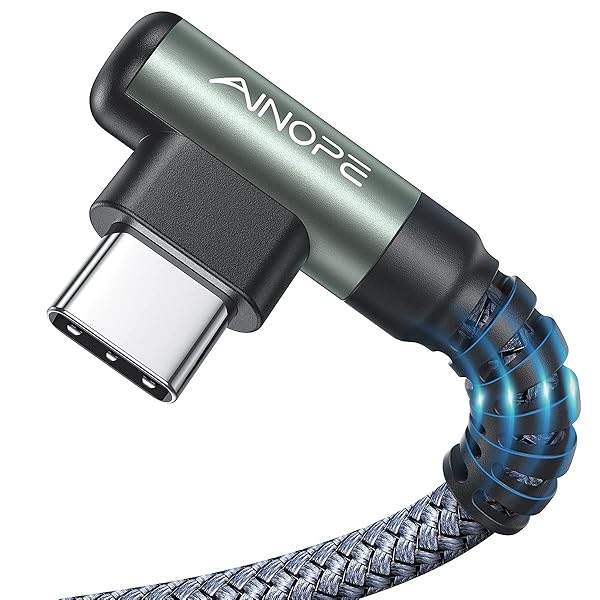
Best for Car • ~$8 • 2-pack • 6.6 ft
AINOPE's right-angle USB-A to USB-C cables are built for awkward ports — car dashboards, bedside outlets, and tight desk grommets. The 90° connector reduces strain on the phone port when the cable hangs downward.
- Right-angle USB-C connector reduces port wear
- Two 6.6 ft cables in one purchase
- Works with car USB, older bricks, and USB-A hubs
- Braided jacket for heat and flex resistance
Pros
- Ideal for in-car and bedside charging
- Two long cables for rotation
- Right angle protects phone connector
- Affordable 2-pack pricing
Cons
- USB-A side limits peak speed vs USB-C PD
- Right angle may not fit every case or mount
- Not optimized for high-watt laptop charging
UGREEN USB-C 3.0 (5 Gbps)
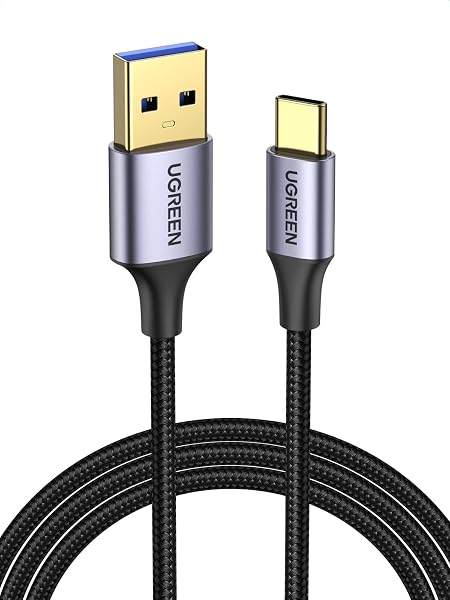
Best for Data • ~$12 • 6.6 ft
When you need more than charging — Android Auto, external drives, or faster file sync — UGREEN's USB 3.0-rated USB-C cable is the specialist pick. It still charges devices, but the emphasis is reliable data throughput.
- USB 3.0 / 5 Gbps data transfer rating
- Suitable for Android Auto and accessories
- Braided build for desk and travel
- USB-A to USB-C for car and computer USB 3.0 ports
Pros
- Better for data-heavy use cases
- Trusted brand in USB accessories
- Long 6.6 ft reach for car and desk
- Still handles everyday phone charging
Cons
- May cost more than charge-only cables
- Not the highest laptop wattage option
- Overkill if you only need overnight phone charging
USB-C to USB-C Cable (Multi-Pack)

Best Value • ~$8 • Multi-pack
If you want spares for your bag, car, kitchen counter, and office drawer in one order, a USB-C multi-pack usually wins on cost per cable. Look for braided options and mixed lengths so each spot gets a sensible fit.
- Lowest cost per cable for households and teams
- Multiple lengths for different rooms
- Good backup strategy for travel and guests
- USB-C to USB-C for modern charger ecosystems
Pros
- Best budget way to stock every room
- Spares reduce panic when one cable fails
- Often includes varied lengths
- Fine for phones and light laptop use
Cons
- Brand and wattage ratings vary by listing
- May not hit top laptop wattage on every cord
- Quality less consistent than single premium picks
Basesailor USB-A to USB-C (2-Pack)

USB-A Pick • ~$10 • 2-pack • 6.6 ft
Basesailor's straightforward USB-A to USB-C pair is the no-nonsense choice when your charger, car, or hub still uses the rectangular USB-A port. Two long cables cover home and travel without a premium price.
- USB-A to USB-C for legacy ports and car USB
- Two 6.6 ft cables per pack
- General-purpose charging for phones and tablets
- Simple backup when USB-C cables won't fit
Pros
- Low-priced USB-A 2-pack
- Two cables included
- Works everywhere USB-A still exists
- Easy spare for guests and rental cars
Cons
- Slower peak charging than USB-C PD setups
- Not ideal for high-watt laptops
- Straight connector — less ideal than right-angle in cars
How to choose the right charging cable
USB-A vs USB-C connectors
Look at the port on your power brick, car outlet, or hub — not just your phone. Oval USB-C ports need USB-C to USB-C cables for the best results. Rectangular USB-A ports still need USB-A to USB-C cables, and that will not change overnight even as devices move to USB-C.
Wattage and charging speed
Phones often charge fine with 20W–30W cables. Laptops frequently need 60W, 100W, or more. Check your charger label and pick a cable rated at or above that wattage. A under-rated cable may charge slowly or get warm under laptop loads.
Length and durability
6 ft cables are the sweet spot for desk and bedside use. 3 ft works for travel pouches. Braided jackets and solid strain relief at the connector usually outlast thin PVC cables in bags and drawers.
Charging-only vs data cables
Charge-only cables are cheaper but may frustrate you with Android Auto, external drives, or docking. If you connect accessories, choose a USB 3.0-rated data cable like our UGREEN pick. For wall charging only, focus on wattage and build quality instead.
USB-C charging cable FAQ
Do I need USB-C to USB-C or USB-A to USB-C?
Match the cable to the port on your charger. Modern USB-C wall bricks and laptop chargers use USB-C to USB-C. Car USB ports, older power bricks, and many hotel hubs still use USB-A to USB-C. When in doubt, check the charger you plug into every day.
What wattage cable do I need for a laptop?
Read the wattage on your laptop charger (often 45W, 65W, or 100W) and choose a cable rated at or above that number. Our top INIU pick is rated to 240W, which covers most consumer laptops with headroom. Phone-only cables are not always suitable for notebooks.
Are braided cables worth it?
For cables you roll, stuff in bags, and flex daily, braided jackets usually resist fraying better than thin plastic. They cost slightly more upfront but often last longer at the connector — where most cheap cables fail first.
Why is my cable charging slowly?
Slow charging usually comes from a mismatched cable, an under-powered charger, or a dirty port — not just the phone. Confirm you are using the right connector type (USB-A vs USB-C), a cable rated for enough watts, and the fastest port on your charger if it has more than one.
Does cable length affect charging speed?
Very long, very thin cables can add resistance and slightly reduce charging speed, but for typical 3–6 ft USB-C cables from reputable brands, length is rarely the bottleneck. Wattage rating and charger output matter far more.
Can one cable charge my phone and laptop?
Yes — a high-watt USB-C to USB-C cable (like our INIU pick) can charge both, assuming your phone and laptop accept USB-C power delivery. Keep a USB-A to USB-C spare if you still use car or legacy chargers so you are never stuck without a match.
Final verdict
Our top recommendations
For most people on modern USB-C chargers, the INIU USB-C to USB-C (240W) (~$10) is the best cable to buy first. Need USB-A compatibility? Add the Basesailor 2-pack (~$10). For the car or a tight nightstand, AINOPE's right-angle pair (~$8) is the most practical shape.
Build out the rest of your desk setup with our ergonomic keyboards guide, laptop stands roundup, and home office setup guide.
As an Amazon Associate, we earn from qualifying purchases. Prices and availability subject to change. Product names and logos are trademarks of their respective owners. Amazon and the Amazon logo are trademarks of Amazon.com, Inc. or its affiliates.

Thomas Camp Jr.
Thomas has spent 14+ years advising small business owners on the tools, equipment, and software that actually improve daily operations — including the cables and accessories people rely on every day at their desks.


