

Affiliate disclosure: Disclosure: Trusted Product Scout may earn affiliate commissions from purchases made through links on this page, at no extra cost to you. Product information accurate as of December 2025.
Building the perfect home office doesn't have to break the bank. Whether you're a remote worker, entrepreneur, or freelancer, this complete guide shows you exactly how to create a productive, ergonomic workspace for under $1,000.
A well-designed home office setup can dramatically improve your productivity, comfort, and overall well-being during long work hours. We've carefully selected 10 essential products that work together to create the ideal workspace without exceeding your budget. Every item has been chosen for its quality, value, and ability to enhance your daily workflow.
- Complete 10-product setup for under $1,000
- Ergonomic furniture to prevent back pain and improve posture
- Technology essentials for video calls and productivity
- Direct Amazon links with current pricing
Creating the perfect home office setup in 2026 means balancing comfort, productivity, and budget. Whether you're transitioning to remote work full-time or upgrading your existing workspace, having the right equipment makes all the difference in your daily productivity and long-term health.
This comprehensive guide walks you through building a complete home office for under $1,000, featuring 10 carefully selected products that work together seamlessly. From an ergonomic standing desk and supportive chair to essential tech accessories, we've researched and tested the best options available on Amazon with strong customer ratings and proven performance.
Our selection prioritizes ergonomics to help prevent back pain, eye strain, and other common issues associated with long hours at a desk. Every product recommendation includes detailed specifications, pros and cons, and direct purchase links to make your shopping experience as smooth as possible.
Complete Home Office Budget Breakdown
Here's exactly how we allocated the $1,000 budget to create a complete, functional home office that doesn't sacrifice quality. This setup prioritizes the most important elements—ergonomic furniture and a reliable monitor—while keeping costs reasonable on accessories.
Total Investment: $746
Budget Remaining: $254 for personalization and upgrades
| Category | Product | Price | Priority |
|---|---|---|---|
| Desk | FlexiSpot EN1 Bamboo Standing Desk | $239.99 | Essential |
| Chair | CAPOT Ergonomic Mesh Chair | $189.99 | Essential |
| Monitor | Acer SH242Y 24″ (1080p, 120Hz) | $89.99 | Essential |
| Monitor Arm | VIVO Single Monitor Mount | $34.99 | High |
| Webcam | Logitech C920 HD Pro | $69.99 | High |
| Keyboard/Mouse | Logitech MK270 Wireless Combo | $22.99 | Essential |
| Footrest | ErgoFoam Adjustable Footrest | $41.95 | Medium |
| Desk Lamp | Lepro LED Desk Lamp | $21.84 | Medium |
| Desk Pad | XXL Professional Large Mouse Pad | $12.89 | Low |
| Cable Management | Under Desk Cable Management Large | $20.99 | Low |
| TOTAL | $745.61 | – | |
Prices are approximate and may vary. Check Amazon for current deals and availability. All products selected based on customer ratings of 4.0+ stars.
The 10 Essential Products for Your Home Office Setup
We've carefully selected each product based on quality, value, and customer satisfaction. Every item works together to create an ergonomic, productive workspace that supports long hours of focused work without breaking your budget.
FlexiSpot EN1 Bamboo Standing Desk

Foundation of Your Setup • $239.99
The FlexiSpot EN1 is the cornerstone of your home office setup. This bamboo standing desk provides the perfect foundation for a productive workspace with smooth, quiet height adjustment from 28″ to 47.6″. The beautiful bamboo desktop is eco-friendly, durable, and adds a natural warmth to your workspace while eliminating gaps and wobbling.
With 4 programmable memory presets, you can instantly switch between your preferred sitting and standing heights at the touch of a button. The electric motor operates whisper-quiet (under 50dB) and moves at 1″ per second, making transitions smooth and non-disruptive. The desk supports up to 176 pounds, easily handling your complete setup including monitor, laptop, and accessories.
The solid bamboo construction uses sustainable, high-quality materials that won't bend even under daily use. The industrial-grade steel frame provides excellent stability, and the desk has been tested through 20,000 raising and lowering cycles to ensure long-term reliability. This makes it perfect for both working and using with a walking pad for active work sessions.
- Beautiful bamboo desktop (eco-friendly and durable)
- Electric height adjustment: 28″ to 47.6″
- 4 programmable memory presets for instant height changes
- Quiet motor operation under 50dB
- 176 lb weight capacity supports full setup
- Industrial-grade steel frame for stability
- 20,000+ cycle durability testing
- Easy assembly in under 30 minutes
Pros
- Smooth, quiet electric height adjustment
- Memory presets make switching effortless
- Beautiful bamboo adds natural warmth
- Excellent value for electric standing desk
- High weight capacity for full setup
Cons
- Desktop and frame ship separately
- Assembly requires two people recommended
CAPOT Ergonomic Mesh Office Chair
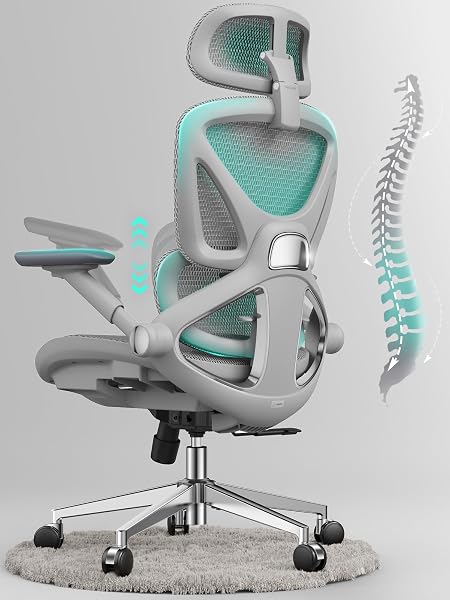
Breathable Comfort • $189.99
The CAPOT Ergonomic Mesh Office Chair is our top value pick for comfortable, all-day seating. With a full mesh back and mesh seat, this chair provides superior breathability that keeps you cool during longer periods of sitting, especially in hot environments or during summer months.
The adjustable lumbar support aligns perfectly with your spine's natural curve, helping you maintain healthy working posture and reducing the risk of lower back pain. The adjustable backrest height allows you to fine-tune the chair to your body, while 2D adjustable seat arms (height and depth) ensure your arms rest comfortably whether you're typing, using a mouse, or taking calls.
This chair encourages you to sit upright naturally, supporting your back without forcing an uncomfortable position. The seat is height adjustable to fit various desk sizes, and the smooth-rolling wheels make repositioning effortless. At under $200, it delivers features typically found in chairs costing significantly more.
- Full mesh back and seat for maximum breathability
- Adjustable lumbar support prevents back pain
- Adjustable backrest height for custom fit
- 2D adjustable armrests (height and depth)
- Height adjustable to pair with any desk
- Promotes healthy upright posture naturally
- Smooth-rolling wheels for easy movement
- Supports up to 250 lbs
Pros
- Excellent breathability prevents sweating
- Strong lumbar support reduces back pain
- Great value under $200
- Encourages natural healthy posture
- Ideal for hot climates or summer
Cons
- No headrest included
- Armrests are 2D instead of 3D adjustable
Acer SH242Y 24″ IPS Monitor

Sharp Display • $89.99
The Acer SH242Y delivers exceptional value as a 24-inch 1080p IPS monitor perfect for home office productivity. With accurate colors covering the entire sRGB color space and a 120Hz refresh rate, this monitor provides noticeably smoother motion compared to standard 60Hz displays, making it comfortable for both work and occasional entertainment.
The IPS panel ensures excellent viewing angles and consistent colors whether you're sitting directly in front or viewing from the side. With a 250-nit peak brightness and 1,000:1 contrast ratio, text remains crisp and readable even during long work sessions. The monitor supports AMD FreeSync technology to eliminate screen tearing if you occasionally use it for light gaming or video playback.
At 24 inches, this monitor hits the sweet spot for desk work—large enough to comfortably view multiple windows side-by-side, but not so large that you need to turn your head constantly. The compact footprint works perfectly on the FlexiSpot desk, leaving plenty of room for your keyboard, mouse, and accessories.
- 24-inch IPS display with 1920×1080 resolution
- 120Hz refresh rate for smooth motion
- 100% sRGB color accuracy for true-to-life images
- 250-nit brightness with 1,000:1 contrast
- Wide viewing angles from IPS technology
- AMD FreeSync support
- HDMI and VGA connectivity
- Compact 24″ size perfect for desk work
Pros
- Excellent color accuracy for productivity
- 120Hz provides smoother experience than 60Hz
- Perfect 24″ size for desk work
- Great value under $150
- IPS panel has superior viewing angles
Cons
- No DisplayPort (HDMI and VGA only)
- Stand only tilts (recommend pairing with monitor arm)
VIVO Single Monitor Arm Mount

Maximize Desk Space • $34.99
The VIVO Single Monitor Arm transforms your workspace by freeing up valuable desk real estate. By elevating your monitor off the desk surface, you gain room for documents, notebooks, or simply a cleaner, less cluttered workspace. The gas spring mechanism provides smooth, tool-free adjustments in all directions.
With full articulation offering +90° to -90° tilt, 360° swivel, and 360° rotation, you can position your screen at the perfect ergonomic angle to reduce neck strain. The monitor can easily switch between landscape and portrait orientations depending on your task. Height adjustment along the 16″ center pole ensures your screen sits at eye level whether you're sitting or standing.
The heavy-duty C-clamp securely attaches to desks up to 3.3″ thick (perfect for the FlexiSpot), while an optional grommet mount is included for permanent installations. Integrated cable clips keep your power and video cables organized and out of sight. The sturdy steel construction supports monitors up to 32″ and 22 lbs, backed by a 3-year warranty.
- Gas spring mechanism for effortless positioning
- Full articulation: ±90° tilt, 360° swivel and rotation
- Height adjustable along 16″ center pole
- Supports monitors 13-32″ weighing up to 22 lbs
- VESA 75x75mm and 100x100mm compatible
- Heavy-duty C-clamp or grommet mount
- Integrated cable management clips
- 3-year manufacturer warranty
Pros
- Frees up significant desk space
- Smooth gas spring adjustments
- Perfect ergonomic positioning
- Excellent value under $40
- Easy installation with included tools
Cons
- Arm extends behind desk (requires clearance)
- May need tension adjustment for lighter monitors
Logitech C920 HD Pro Webcam

Professional Video Calls • $69.99
The Logitech C920 is the gold standard for video conferencing in home offices. With Full HD 1080p video at 30fps, you'll look crisp and professional on every video call, whether it's team meetings, client presentations, or virtual interviews. The glass lens and premium autofocus ensure you stay sharp even when moving.
Dual built-in microphones capture your voice clearly from up to 3 feet away, with automatic noise reduction to minimize background distractions. The automatic light correction adjusts to your environment, so you look great even in less-than-ideal lighting conditions. This eliminates the washed-out or too-dark appearance common with cheaper webcams.
The universal clip fits securely on top of your monitor (or laptop) and adjusts to find the perfect angle. The 78° field of view captures you clearly without including too much of your background. Compatible with all major video platforms including Zoom, Microsoft Teams, Google Meet, and Skype, the C920 works instantly with plug-and-play simplicity—no drivers needed.
- Full HD 1080p video at 30fps
- Premium glass lens with autofocus
- Dual microphones with noise reduction
- Automatic light correction for any environment
- 78° field of view (captures you without excess background)
- Universal monitor clip with angle adjustment
- Works with Zoom, Teams, Meet, Skype, and more
- Plug-and-play—no drivers needed
Pros
- Industry standard for video quality
- Excellent autofocus and light correction
- Built-in mics reduce need for headset
- Works instantly with all platforms
- Reliable Logitech build quality
Cons
- No 60fps option (only 30fps)
- Microphone quality good but not studio-level
Logitech MK270 Wireless Combo

Reliable Input Combo • $22.99
The Logitech MK270 Wireless Combo provides reliable, comfortable typing and navigation at an unbeatable price. The full-size keyboard features quiet keys that won't disturb others during video calls, with a familiar layout including number pad for easy data entry. Eight shortcut keys provide instant access to email, calculator, and media controls.
The contoured wireless mouse fits comfortably in either hand and features smooth, precise cursor control. Both devices connect through a single tiny USB receiver that stays plugged into your computer—no Bluetooth pairing hassles. The 2.4GHz wireless connection provides reliable performance up to 33 feet away with virtually no lag or dropouts.
Battery life is exceptional: the keyboard lasts up to 24 months and the mouse up to 12 months on included batteries (actual life varies by use). The plug-and-play setup takes seconds, and the spill-resistant keyboard design protects against accidental coffee mishaps. For under $30, it's hard to find a more reliable wireless combo.
- Full-size keyboard with number pad
- Quiet, comfortable key typing
- 8 programmable shortcut keys
- Contoured ambidextrous mouse
- Single USB receiver for both devices
- Up to 24-month keyboard battery life
- Spill-resistant keyboard design
- Plug-and-play—works instantly
Pros
- Exceptional value under $30
- Reliable wireless with no dropouts
- Long battery life saves money
- Quiet typing won't disturb calls
- Trusted Logitech quality
Cons
- Not mechanical (membrane keys)
- Mouse is basic (no extra buttons)
ErgoFoam Adjustable Footrest

Ergonomic Support • $41.95
The ErgoFoam Adjustable Footrest improves your sitting posture by elevating your feet to the proper angle, reducing pressure on your lower back and improving circulation in your legs. This is especially important if your feet don't naturally rest flat on the floor when your chair is adjusted to the correct height for your desk.
The premium memory foam cushion conforms to your feet for customized comfort, while the textured surface provides a gentle massage effect that promotes blood flow during longer periods of sitting. Two height settings (3.9″ and 5.1″) allow you to find the perfect elevation for your body. The footrest's rocking motion capability lets you gently move your feet throughout the day, preventing stiffness.
The non-slip bottom keeps the footrest firmly in place on any floor surface, whether carpet, hardwood, or tile. The removable, machine-washable cover makes maintenance easy. At 17.8″ wide, it provides ample room for both feet while fitting neatly under most desks. The compact design is also portable enough to take with you if you work from multiple locations.
- Premium memory foam cushion molds to feet
- Two height settings: 3.9″ and 5.1″
- Textured surface provides gentle massage
- Rocking motion prevents stiffness
- 17.8″ wide accommodates both feet comfortably
- Non-slip bottom stays in place
- Removable, machine-washable cover
- Portable for multi-location work
Pros
- Significantly improves posture and comfort
- Reduces lower back pressure
- Memory foam provides excellent cushioning
- Two heights work for different users
- Easy to clean with washable cover
Cons
- May compress over time with heavy use
- Not needed if feet naturally rest flat
Lepro LED Desk Lamp
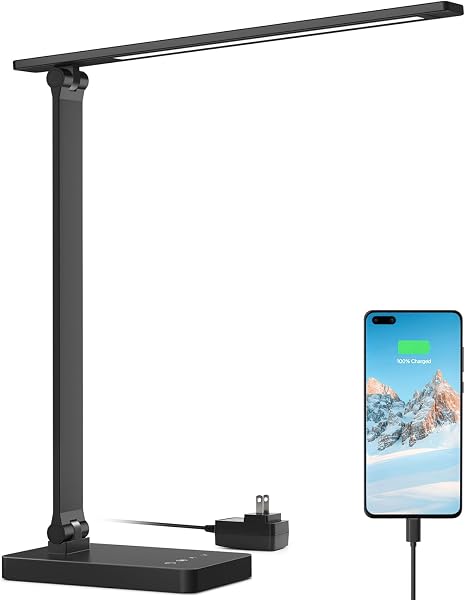
Eye-Caring Lighting • $21.84
The Lepro LED Desk Lamp provides customizable, eye-friendly lighting that reduces eye strain during long work sessions. With 5 color modes (from warm 3000K to cool 5000K) and multiple brightness levels, you can dial in the perfect lighting for any task or time of day. Cooler light helps you stay alert during morning work, while warmer tones ease eye fatigue in the evening.
The lamp outputs bright, even illumination—bright enough to illuminate your entire desk without being harsh or creating glare on your monitor. The LED bulbs are flicker-free and produce no blue light hazard, protecting your eyes even during extended use. The energy-efficient LEDs last up to 50,000 hours, meaning you'll likely never need to replace them.
The flexible gooseneck arm bends easily to direct light exactly where you need it, whether that's your keyboard, documents, or a specific area of your desk. The sturdy metal base provides stability without taking up much desk space. Touch controls on the base make adjustments quick and intuitive, and the lamp remembers your last brightness setting when turned back on.
- 5 color modes: 3000K-5000K for any task
- Multiple brightness levels for customization
- Flicker-free, no blue light hazard
- Energy-efficient LED (50,000 hour life)
- Flexible gooseneck for precise positioning
- Touch controls with memory function
- Sturdy metal base
- Compact footprint saves desk space
Pros
- Highly customizable lighting options
- Eye-friendly design reduces strain
- Flexible arm directs light perfectly
- Memory function is convenient
- Incredible value under $25
Cons
- No USB charging port
- Gooseneck may loosen over time with heavy adjustments
XXL Professional Large Mouse Pad

Desk Protection • $12.89
An extended desk pad transforms your workspace by providing a smooth, consistent surface for both your mouse and keyboard. This XXL professional desk pad covers a large portion of your desk, protecting the surface from scratches, spills, and daily wear while creating a professional appearance.
The smooth surface provides excellent tracking for both optical and laser mice, while being durable enough to handle your keyboard sitting on it all day. The water-resistant coating means accidental coffee or water spills can be quickly wiped away without damage to your desk. The stitched edges prevent fraying even after months of daily use.
The non-slip rubber base keeps the pad firmly in place—no sliding or bunching during intense work sessions. The ultra-thin profile provides just enough cushioning for comfortable typing without the pad being too squishy or unstable. Available in multiple colors, you can match your desk pad to your office aesthetic.
- XXL professional size for full coverage
- Smooth surface for precise mouse tracking
- Water-resistant coating protects desk
- Stitched edges prevent fraying
- Non-slip rubber backing stays put
- Ultra-thin profile for comfort without bulk
- Available in multiple colors
- Easy to clean with damp cloth
Pros
- Protects desk from daily wear
- Large size accommodates keyboard and mouse
- Water-resistant prevents damage from spills
- Exceptional value under $15
- Creates professional, cohesive look
Cons
- May have slight odor when new (airs out quickly)
- Surface can show smudges/fingerprints on darker colors
Under Desk Cable Management Large

Clean Organization • $20.99
A cable management kit is the finishing touch that transforms a functional workspace into a professional one. This comprehensive kit includes under-desk cable trays, cable sleeves, and adhesive clips to route all your cables neatly out of sight. The result is a clean desk surface free from tangled cords and visual clutter.
The large under-desk cable tray mounts easily beneath your desk with included screws or adhesive strips. It holds power strips, excess cable length, and power adapters, keeping them organized and accessible but hidden from view. The open mesh design allows heat dissipation and makes adding or removing cables simple.
Cable sleeves bundle multiple cables together into a single neat tube that runs from your desk to the floor or wall outlet. The split design allows you to add or remove cables without disassembling everything. Adhesive cable clips route individual cables along desk edges or legs, preventing them from drooping or tangling. The included velcro ties keep excess cable length bundled neatly.
- Large under-desk cable tray for maximum storage
- Cable sleeves for bundling multiple cords
- Adhesive cable clips for routing
- Velcro cable ties for bundling
- Easy installation with screws or adhesive
- Mesh design allows heat dissipation
- Split sleeves for easy cable addition/removal
- Keeps power strips and adapters hidden
Pros
- Dramatically cleans up cable mess
- Makes adding/removing cables easier
- Professional, polished appearance
- Easy to install in 30 minutes
- Great value under $25
Cons
- Adhesive may fail on textured desk undersides
- Takes time to route everything initially
Home Office Setup Guide: Building Your Workspace
Setting up a productive home office involves more than just buying furniture and tech. Here's how to approach your setup strategically to maximize comfort, productivity, and value.
What makes a great home office setup?
- A great home office prioritizes ergonomics to prevent pain and fatigue during long work sessions
- The right setup reduces distractions, improves focus, and supports your specific workflow needs
- Quality equipment in the right places makes a bigger difference than expensive items across the board
View Complete Setup Guide
1. Start with Ergonomic Furniture
Your desk and chair are the foundation of your setup and deserve the biggest portion of your budget. Spending $440 combined on the FlexiSpot desk and CAPOT chair prevents the back pain, neck strain, and fatigue that plague remote workers using inadequate furniture.
- A standing desk isn't a luxury—it's an investment in your long-term health
- Your chair should support your natural posture, not force you into an uncomfortable position
- Both should be highly adjustable to fit your body, not the other way around
2. Choose the Right Monitor Size
For most home office workers, a single 24-inch monitor hits the sweet spot. It's large enough to comfortably view documents and spreadsheets side-by-side, but not so large that you're constantly turning your head or dealing with neck strain.
- 24″ works perfectly at typical desk viewing distances (20-30 inches away)
- 1080p resolution on a 24″ screen keeps text sharp and readable
- Adding a monitor arm maximizes desk space and improves ergonomic positioning
- If you need more screen space, consider a second monitor rather than one very large one
3. Invest in Video Call Quality
In remote work, video calls are your primary interface with colleagues and clients. A quality webcam like the C920 makes you look professional and engaged, while built-in laptop cameras often make you appear washed out or pixelated.
- Clear video and audio are non-negotiable for professional communication
- Proper lighting (from your desk lamp) dramatically improves webcam quality
- Position your webcam at eye level for the most natural appearance
4. Don't Overlook Lighting
Poor lighting causes eye strain, headaches, and fatigue—yet it's often the most neglected aspect of home offices. A quality desk lamp with adjustable color temperature lets you customize lighting based on the task and time of day.
- Cool light (5000K) helps maintain focus during the day
- Warm light (3000K) reduces eye strain in the evening
- Position your lamp to avoid glare on your monitor screen
- Brightness should be similar to your ambient room lighting
5. Manage Cables from Day One
Cable management seems trivial until you experience the difference. Taking 30 minutes to route cables properly means you'll never again deal with tangled cords, won't knock cables loose accidentally, and can clean your desk in seconds.
- Install cable management before you set up your electronics
- Group cables by destination (power, data, etc.)
- Leave some slack for height adjustment on your standing desk
- Label cables if you have many similar ones
6. Budget Priorities
If you need to adjust the budget, here's where to save and where not to:
- Don't Compromise: Desk, chair, and monitor—these impact your daily comfort and productivity
- Safe to Save: Keyboard/mouse (the MK270 works great), desk pad, footrest
- Easy Upgrades Later: Webcam (use laptop camera initially), desk lamp (use existing lighting)
- Free Alternatives: Cable management (DIY with zip ties), desk pad (not essential initially)
7. Assembly and Setup Timeline
Budget time for assembly and configuration:
- Week 1: Assemble desk and chair (2-3 hours), install basic setup
- Week 2: Add monitor arm, organize cables, fine-tune ergonomics
- Week 3: Add lighting, accessories, optimize workflow
- Don't rush—proper setup prevents having to redo things later
For more office setup ideas and complementary products, see our Best Standing Desks 2026 guide and Best Office Chairs 2026 recommendations.
Frequently Asked Questions
Can I really build a complete home office for under $1,000?
Yes! Our complete 10-product setup totals approximately $746, leaving you $254 for personalization or upgrades. The key is prioritizing essential ergonomic furniture (desk and chair) while choosing reliable budget options for accessories (keyboard, mouse, cables).
You don't need expensive mechanical keyboards or premium mice for office productivity work. The budget is allocated where it matters most: preventing back pain and eye strain through quality furniture and monitor.
Do I really need a standing desk, or can I save money with a regular desk?
While you can certainly use a regular desk, a standing desk provides significant long-term health benefits that justify the cost. Alternating between sitting and standing throughout the day improves circulation, reduces back pain, increases energy levels, and can even boost productivity.
If budget is very tight, you could start with a manual standing desk converter (~$100-150) placed on a regular desk, then upgrade to a full electric standing desk later. However, the FlexiSpot EN1 at $250 offers such good value that we recommend starting with it if possible.
What if I already have some of these items?
Perfect! Use that budget savings to upgrade other components. For example:
- If you have a desk: Upgrade to a better chair or add a second monitor
- If you have a keyboard/mouse: Add a laptop stand or better webcam
- If you have a monitor: Invest in a higher-quality chair or add monitor light bar
The beauty of this modular approach is that you can mix and match based on what you already own.
Should I buy everything at once or build gradually?
We recommend a phased approach if you're on a tight budget:
- Phase 1 (Essential): Desk and chair (~$430) – These have the biggest impact on comfort
- Phase 2 (High Priority): Monitor and monitor arm (~$125) – Critical for productivity and ergonomics
- Phase 3 (Support): Webcam, keyboard/mouse, lighting (~$115) – Improves professional appearance and comfort
- Phase 4 (Finishing): Footrest, desk pad, cables (~$76) – Refinements and organization
This lets you spread the cost over 2-4 months while immediately addressing the most important needs.
Will this setup work for gaming or creative work too?
This setup is optimized for office productivity, but it works reasonably well for light gaming and basic creative work:
- Gaming: The 120Hz monitor handles casual gaming well, though serious gamers may want 144Hz+
- Photo Editing: The Acer monitor's sRGB accuracy is adequate for basic editing
- Video Editing: A second monitor would be very helpful for timeline work
- Programming: Perfect for coding—many developers prefer this exact size monitor
For serious gaming or professional creative work, you'd want to budget more for a higher-end monitor and possibly dual monitors.
How much space do I need for this setup?
The FlexiSpot desk is 48″ wide and 24″ deep, so you'll need a space at least 50″ x 30″ to accommodate the desk plus clearance for the chair. Ideally, aim for:
- Minimum: 5 feet wide x 5 feet deep (enough for desk and chair)
- Comfortable: 6 feet wide x 6 feet deep (room to move chair and stand)
- Ideal: 7 feet wide x 7 feet deep (ample space for all movement)
The standing desk needs clearance behind it for the arm extension, and you'll want room to push the chair back when standing.
What about a second monitor?
A second monitor is a fantastic productivity boost, especially for tasks like:
- Coding (code on one screen, documentation/browser on the other)
- Data analysis (spreadsheet on one, visualization on the other)
- Writing (research on one, writing on the other)
- Video calls (meeting on one, notes/shared documents on the other)
If you have budget remaining, add another Acer SH242Y ($90) and a dual monitor arm (~$50-70) instead of the single arm. This brings the total to around $885—well under budget and worth it for many users.
How long will this setup last before needing upgrades?
With proper care, this setup should serve you well for many years:
- Desk: 10+ years (FlexiSpot tested for 20,000 cycles)
- Chair: 5-7 years with regular use
- Monitor: 5-7 years (technology advances may tempt earlier upgrade)
- Webcam: 5+ years (C920 has been reliable for a decade)
- Keyboard/Mouse: 3-5 years depending on use
- Accessories: 3-10 years (lamp, footrest, cables, etc.)
The desk and monitor arm will likely outlast everything else. Most people upgrade monitors and peripherals before the desk or chair wear out.
Final Verdict: Building Your Perfect Home Office
Our Complete Setup Recommendation
For just $746, this 10-product home office setup delivers everything you need for productive, comfortable remote work. The FlexiSpot bamboo standing desk and CAPOT chair form an ergonomic foundation that prevents the back pain and fatigue common in home offices, while the Acer monitor provides crisp, clear visuals for 8+ hour workdays.
Start with the essentials: If you need to phase your purchase, begin with the desk and chair ($430). These have the biggest impact on your daily comfort and long-term health.
The complete package includes:
- Ergonomic furniture to support healthy posture
- Technology for professional video calls
- Proper lighting to reduce eye strain
- Organization tools for a clean, focused workspace
Every product was chosen for its combination of quality, customer satisfaction, and value. You're not sacrificing performance for budget—you're making smart choices about where to invest.
Alternative Configurations
If you have a larger budget ($1,000-1,200):
- Add a second Acer monitor and dual monitor arm (~$125)
- Upgrade to a mechanical keyboard (~$80-120)
- Add premium webcam lighting (~$50)
If you need to stay under $600:
- Use your laptop camera instead of webcam (save $70)
- Skip the footrest initially (save $42)
- Use existing lamp or overhead lighting (save $22)
- Total: ~$612
For additional workspace inspiration and complementary products, explore our Best Standing Desks 2026 guide and Best Office Chairs 2026
All product names, logos, and brands are property of their respective owners. All company, product and service names used in this website are for identification purposes only. Use of these names, logos, and brands does not imply endorsement. Amazon and the Amazon logo are trademarks of Amazon.com, Inc. or its affiliates.

Thomas Camp Jr., EA
Thomas is an Enrolled Agent and tax accountant with over 14 years of experience helping small businesses choose the right payroll, accounting, and operational tools. His recommendations come from hands-on implementation—not just feature lists.


