

Affiliate & review disclosure: UPLIFT Desk provided the V3 L-Shape desk and its accessories, the Sequence Shelving, the file cabinet, and a Bolan Ergonomic Chair at no cost for this review. That did not influence my findings: all opinions are my own. Some links are affiliate links; if you purchase through them, we may earn a small commission at no extra cost to you.
The UPLIFT V3 L-Shape desk has been the front reception desk at my tax office since early September 2026, with UPLIFT's Sequence Shelving and a locking file cabinet beside it and the Bluetooth adapter connecting it to the UPLIFT Desk app. This is not a home office test. Clients walk past this desk every day, and whoever is working the front desk uses it. Here is how the whole setup has held up.
- Installed in a client-facing reception area, not a home office, so it gets daily foot traffic and real use
- Evaluated as a full room system: the L-Shape desk, Sequence Shelving, and a filing cabinet together
- Tested the UPLIFT Desk app and Bluetooth adapter as the smart-desk layer on top of the hardware
- Honest assessment; no paid placement
First impressions & setting up the front desk
Most standing desk reviews happen in a home office: one person, one desk, a controlled environment. This one did not. I installed the UPLIFT V3 L-Shape desk in the reception area of Tax Specialists of the Carolinas, Inc., a working tax preparation and nonprofit compliance office. It is the first thing clients see when they walk in, and it is used by whoever is staffing the front desk that day, not by a single reviewer.
Everything arrived by FedEx Freight. I assembled it myself with one other person helping, and the instructions were clear enough that the build went smoothly from start to finish: about 1.5 to 2 hours from unboxing to a finished desk. UPLIFT says it engineered the V3 in-house with simpler assembly in mind, and that matched my experience. If you would rather not assemble it yourself, UPLIFT can arrange assembly through Taskrabbit (a flat $119 for an L-shaped desk when I checked), and larger office orders can get White Glove delivery and installation by quote.
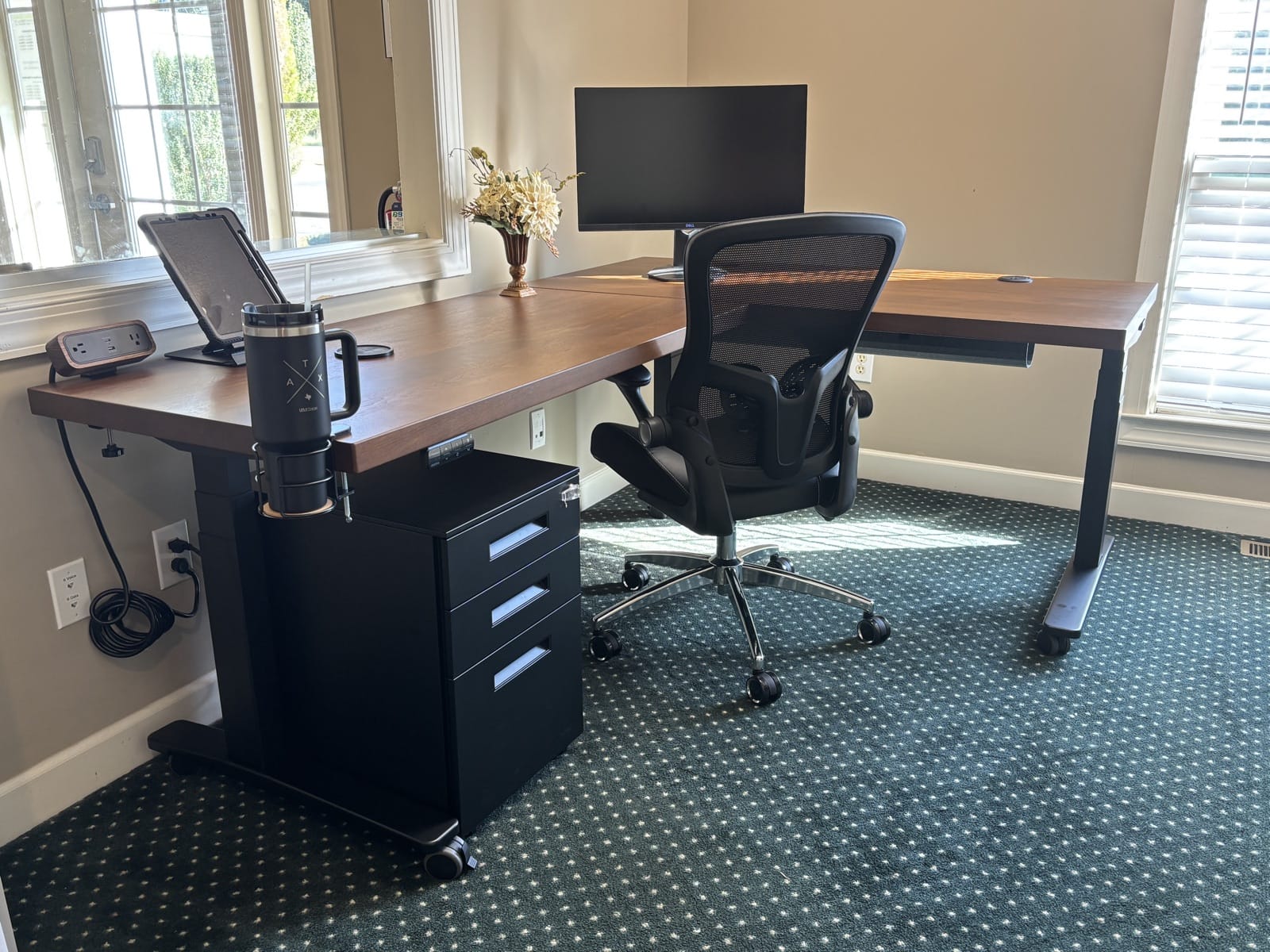
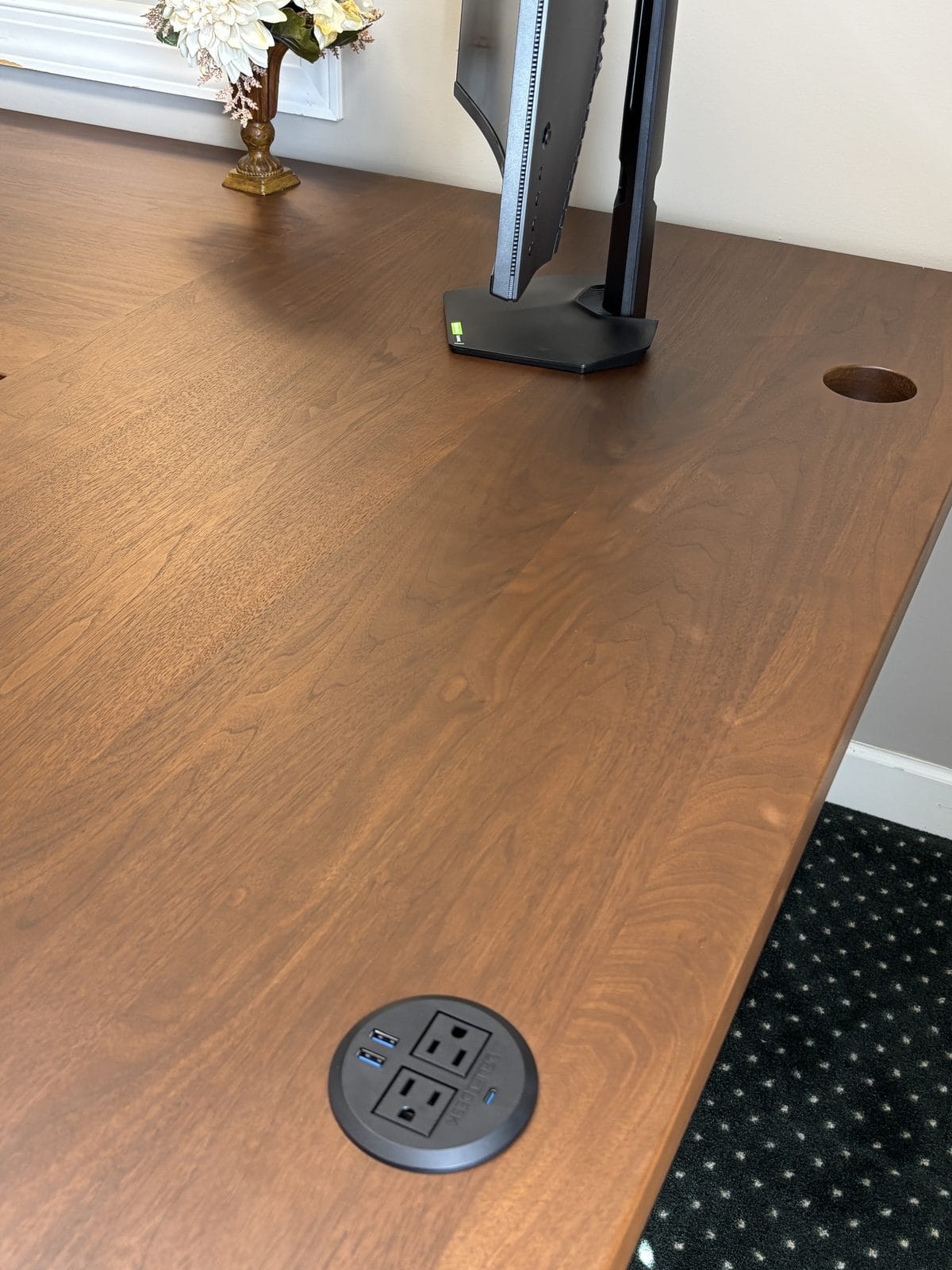
The first thing clients comment on is the walnut top, usually before they reach the counter.
Construction & build quality
This is where the L-Shape earns its price, just as the standard V3 does. It is built on UPLIFT's V3 frame, and for this three-leg L-shape configuration that means a triple-motor system, one motor per leg, rated for up to 535 lbs. The frame adds TremorGuard steel feet, I-Beam crossbars, thread-locked machine screws, and a stability plate, all built to keep the desktop from flexing at any height.
The frame passed third-party testing to ANSI/BIFMA X5.5-2021 and carries a 15-year warranty. UPLIFT says the motors are tested for 20,000 cycles, which it equates to adjusting the desk four times a day for 15 years. UPLIFT has built standing desks for more than 20 years and says the V3 was developed from customer feedback by an engineering team led by a Certified Professional Ergonomist.
For the reception desk, I ordered the V3 L-Shaped 3-Leg frame in black with a custom solid walnut desktop, 1.75 inches thick, at 60 inches on the main run by 84 inches on the return, with the return on the left side. It is a clear step up from UPLIFT's laminate finishes. The walnut is solid wood, and up close the grain shows it.
Despite daily reception traffic, there are no scuffs or marks on the desktop or frame so far. I also added five Soft Roll Desk Casters, which make it easy to move the desk to clean behind it or reposition it on carpet. Keep in mind that the casters add about 2.5 inches to the desk's height (each is rated for 140 lb), which matters if your tallest users are already near the top of the range.
Cable management and accessory mounting
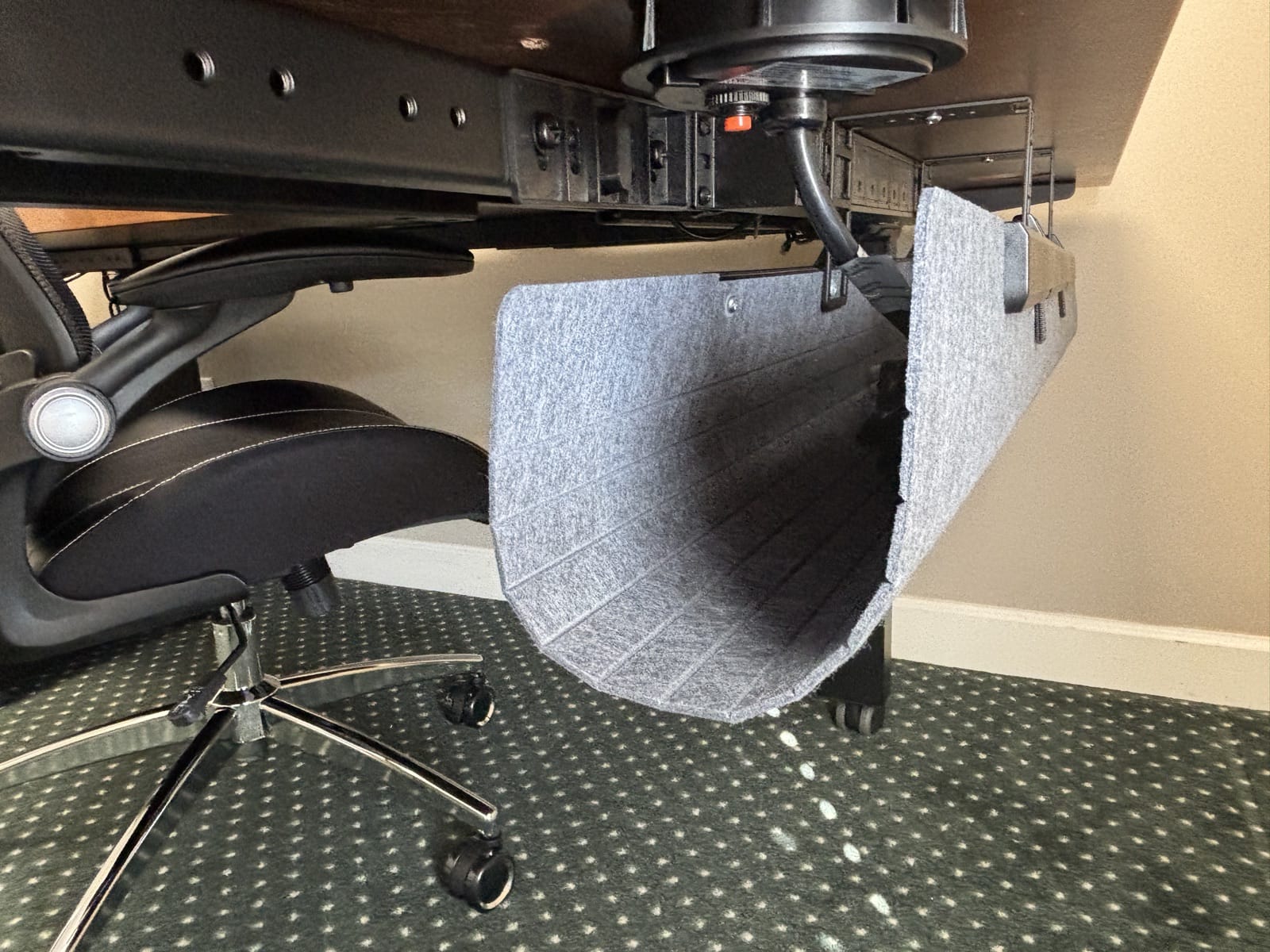
UPLIFT includes its FlexMount Cable Manager with every V3 frame, and the frame's 90-point mounting system lets accessories such as shelves, monitor arms, and surge protectors attach directly to the steel frame without drilling into the desktop.
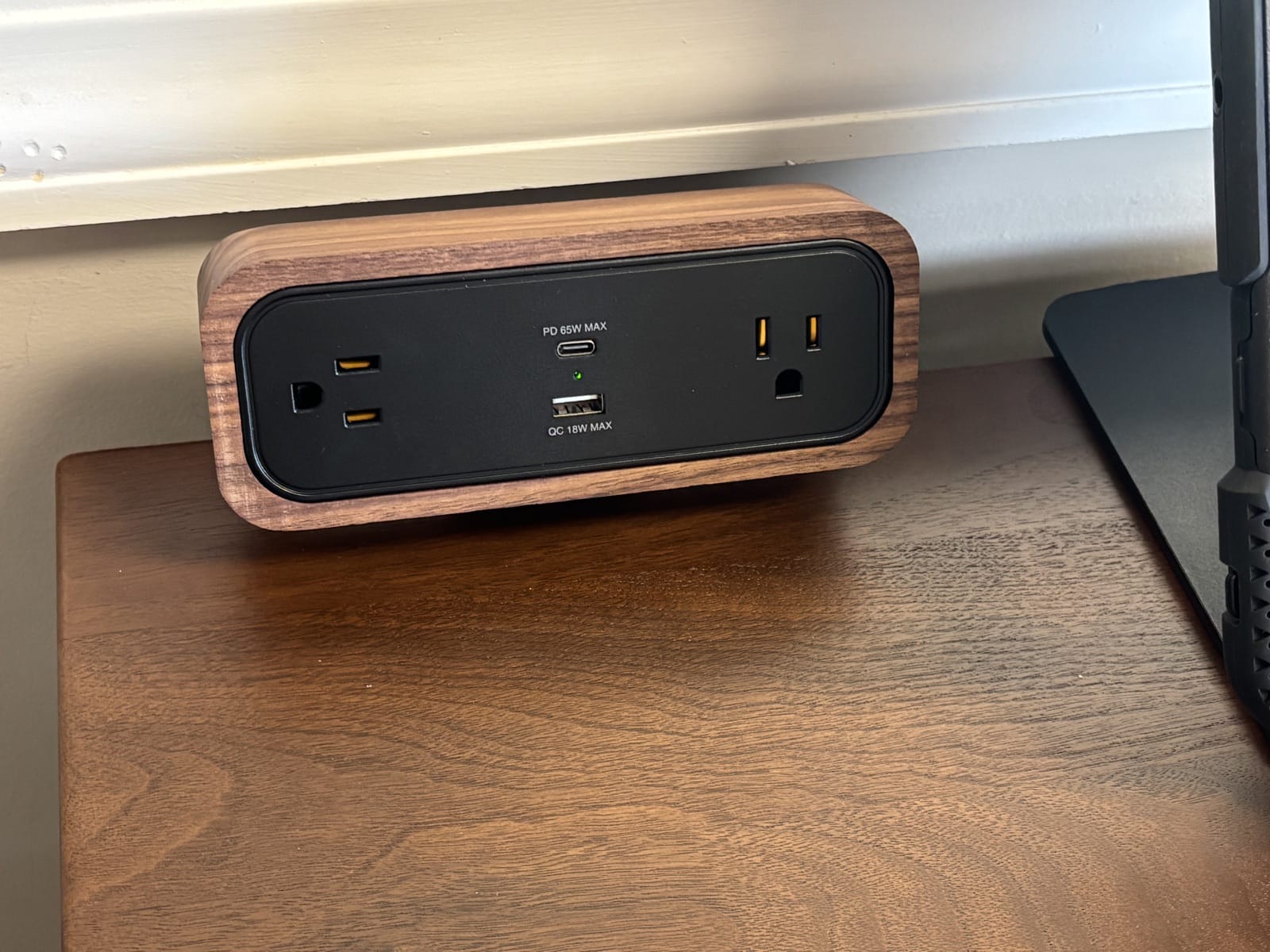
For the reception desk, I added the Advanced Keypad with USB, a Bluetooth Adapter, a power grommet with USB, an 8-outlet mountable surge protector, a DuoMount power strip in a matching walnut accent, a corner sleeve, two zipped cable sleeves, a basic wire management kit, and a 29-inch modesty panel with built-in wire management. Between the grommet, the surge protector, and the DuoMount strip, the front desk powers the monitors, printer, scanner, label maker, and tablet with the cords kept out of clients' sight.
Stability at a client-facing desk: does it wobble?
Stability matters more at a reception desk than almost anywhere else in an office. It is where a client signs a form, sets down a folder of tax documents, or rests a bag while they wait, and a wobbly desk here is visible to everyone who walks in.
The steel frame makes the entire desk extremely sturdy, even at maximum height, corner and return included. Day to day it carries dual monitors, a laser printer, a scanner, a label maker, and a tablet, with no wobble under reception traffic.
Motor, height adjustment & controls
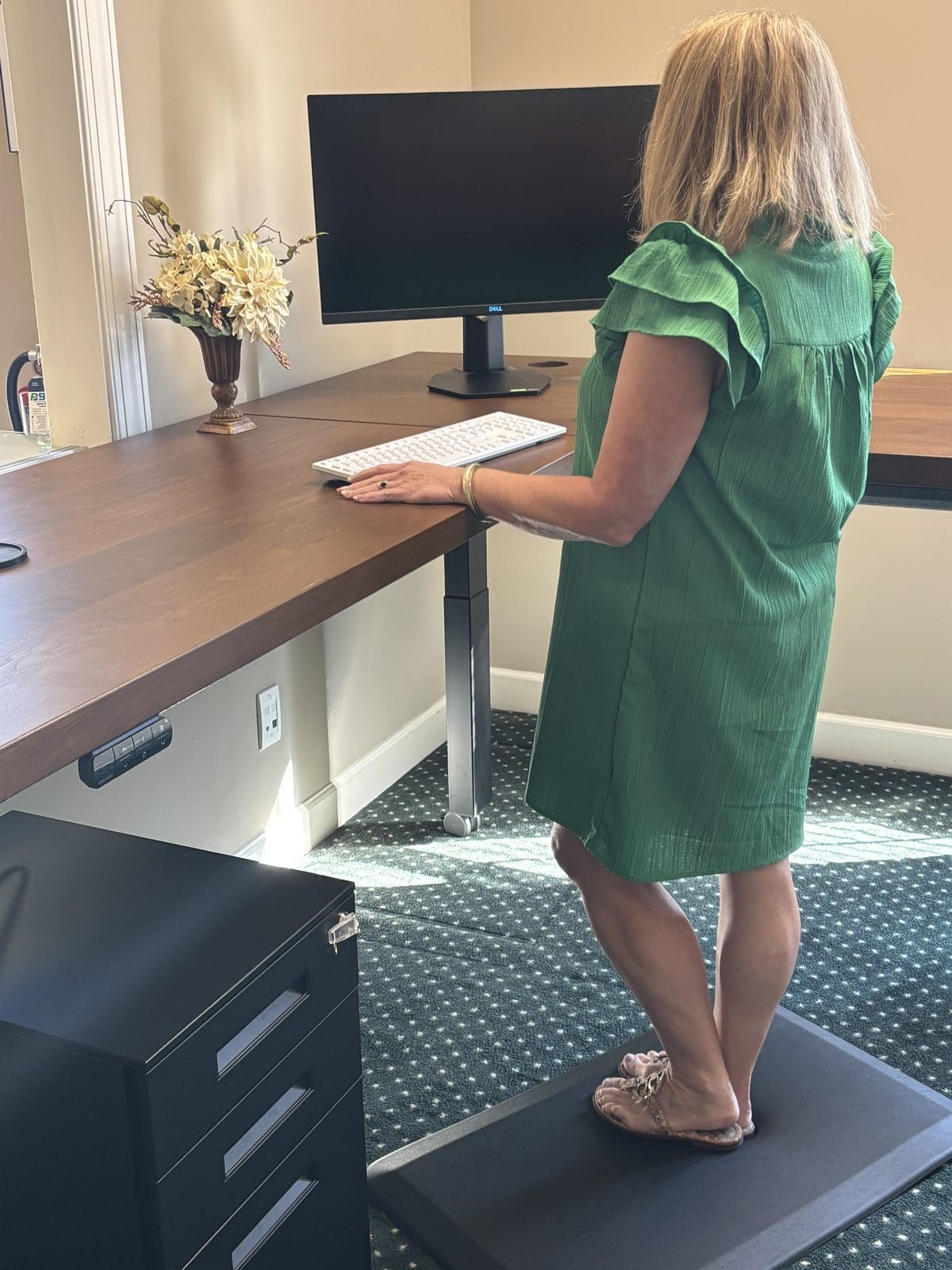
The V3 frame's height range runs 22.6 inches to 48.7 inches. UPLIFT says that fits 95% of users (5th to 95th percentile heights) and meets ANSI/BIFMA G1-2013 ergonomic guidelines. The L-Shape desk's triple-motor system moves the frame smoothly, with programmable memory presets for quick transitions between sitting and standing.
The staff member who works this desk has sitting and standing heights saved as presets, and the motor is extremely quiet. When someone else covers the desk, they use the up and down buttons, and when the regular user returns, one touch brings back their preset.
The UPLIFT Desk app and Bluetooth adapter
The keypad controls height on its own, but UPLIFT also sells a separate Bluetooth Adapter that connects the desk to the UPLIFT Desk app on iOS or Android. UPLIFT lists the adapter as compatible with the V3, V2, and V2-Commercial desk frames and the E7 electric standing desk converter.
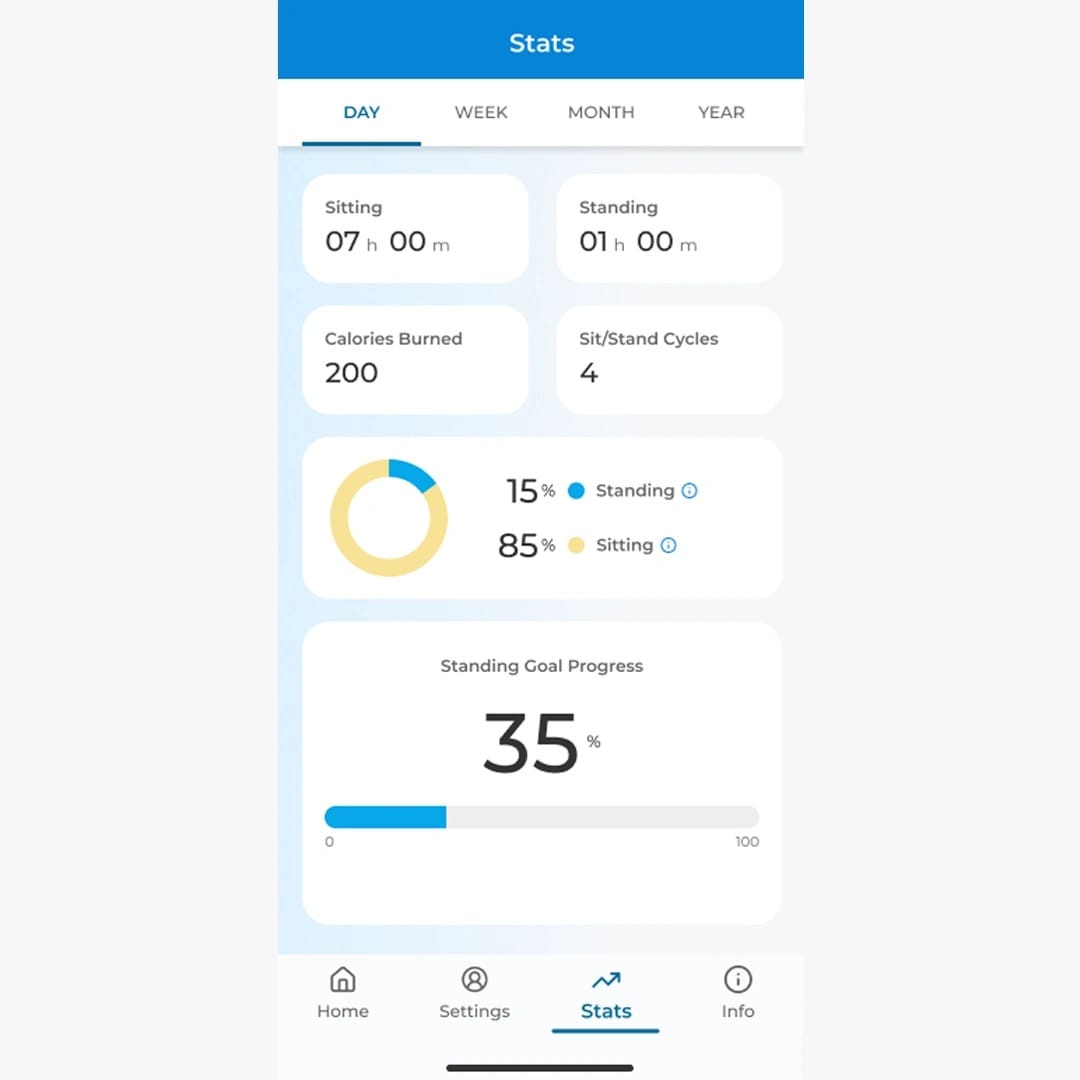
The app tracks sitting and standing time, calories, and sit/stand cycles, and it can send scheduled reminders to switch positions. One tap moves the desk to a saved preset height, including Siri voice control on iOS, and you can set and track a daily standing goal. It also lets you set maximum and minimum height limits as a safety control, and it calibrates its height readings to the desk's actual height so casters or leveling glides do not throw off the numbers. On privacy, UPLIFT says the app does not collect, store, or share personal information or desk usage data "with anyone, including UPLIFT Desk or your company."
Pairing the adapter with the app was easy. At a reception desk, the most useful feature is raising or lowering the desk before you get back to the counter, so it is already at the right height when you step up to greet a client.
One caution: UPLIFT's safety guidance says to check all sides of the desk for obstacles before moving it. If you move it remotely from another room, as I do, make sure the area around it is clear first.
Desktop surface & the L-shape layout
UPLIFT's L-Shape desktops come in a range of sizes and left- or right-return configurations (full dimensions are in the specs table below), in laminate finishes such as Walnut, White, Black, Ash Gray, and Maple, or bamboo at an upcharge.
For this desk, I skipped laminate and went with the custom solid walnut top described above.
The L-Shape comes in many sizes and configurations, so I was able to choose one that fits our reception room perfectly. The size I chose leaves plenty of room for the monitors, printer, scanner, and label maker, plus open workspace to spread out paperwork when a client's return needs a second look. If you are planning your own layout, measure the room and walkways first, then match them in UPLIFT's online configurator.
Sequence Shelving, drawers, and the reception room
A reception area needs more than a desk. Client files, brochures, and supplies all have to stay organized in a space clients can see. Sequence Shelving is a freestanding, modular system, and the file cabinet rolls on its own casters. In my setup, both sit alongside the desk as separate pieces.
Sequence Shelving is modular, with mix-and-match short and tall units, expandable extension pieces, and the same 15-year warranty as the desk. UPLIFT says the Greenguard Gold certified shelves are built to support healthy indoor air and to last long enough to stay out of landfills. Full shelf specs, weight capacity, and pricing are in the table below.
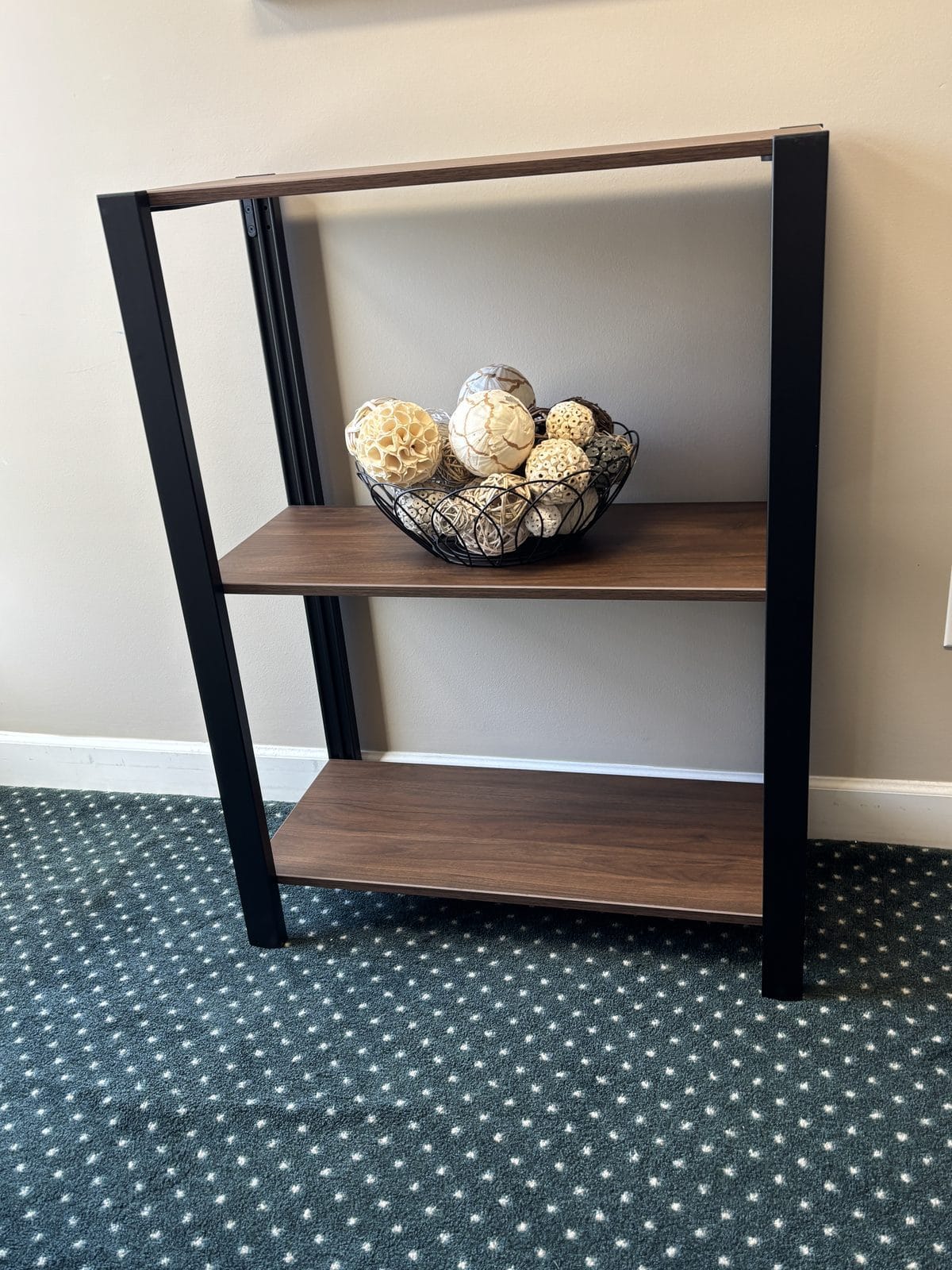
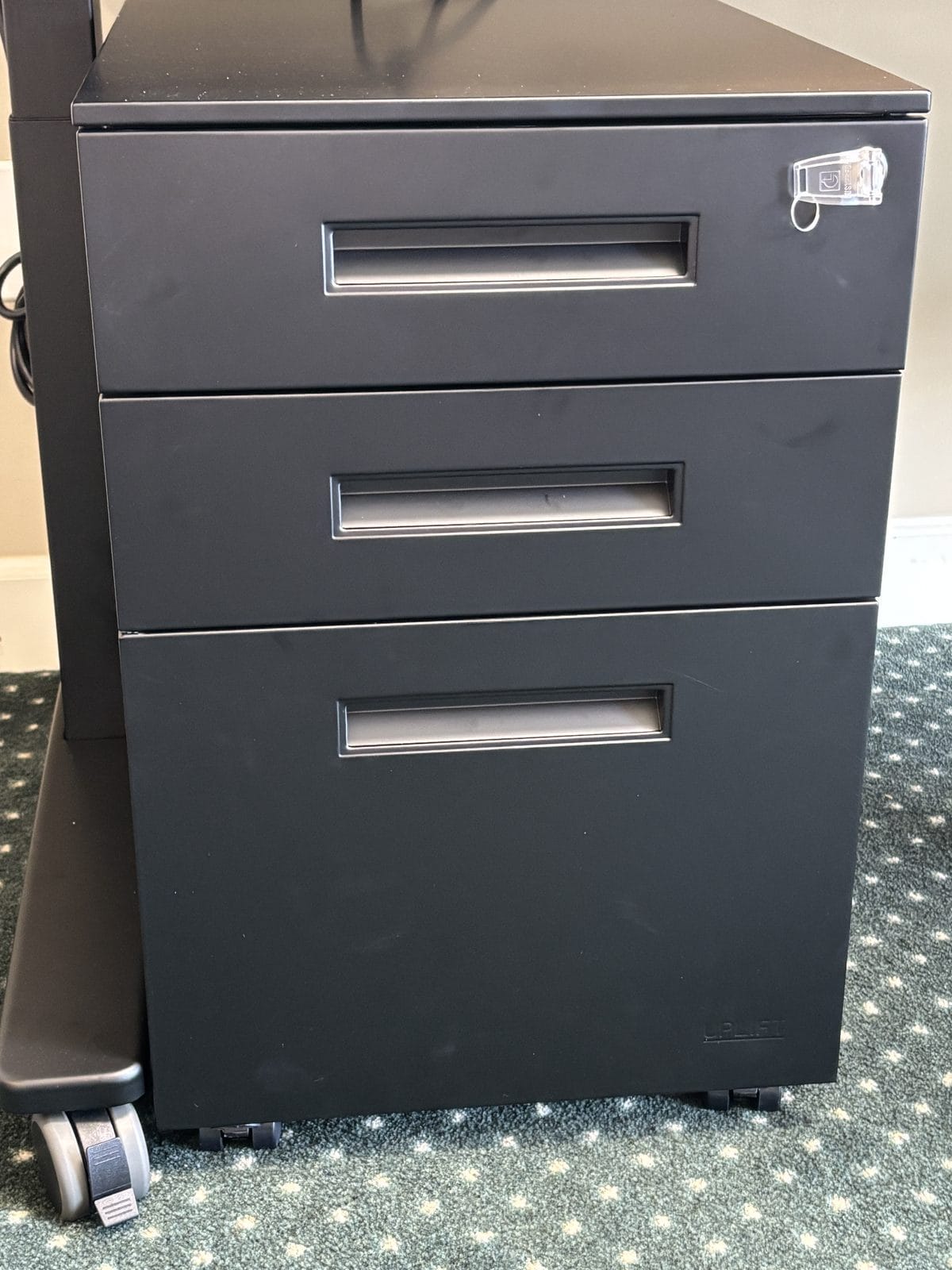
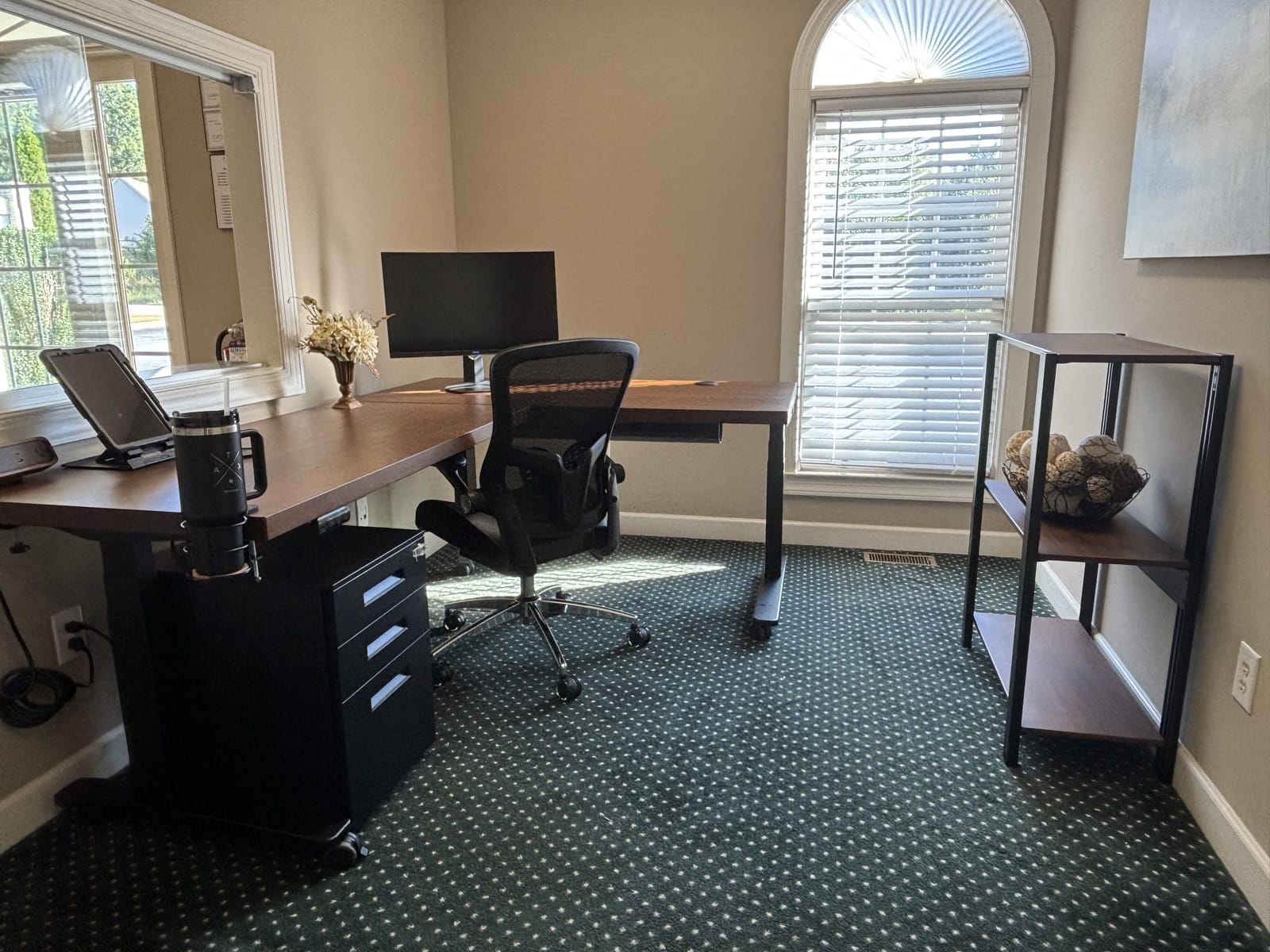
For the reception room, I ordered the Sequence Shelving Short unit with a black frame and three walnut laminate shelves, plus a 3-Drawer Square File Cabinet in black. UPLIFT also included its Bolan Ergonomic Chair with the order, a mesh-back chair with built-in lumbar support and adjustable arms, and that is the chair you see at the desk in these photos. It is comfortable, the adjustments are easy to make, and staff like it, especially the lumbar support.
The 3-Drawer File Cabinet sits under the desk and holds client files and supplies, so the front desk has secure document storage within reach. It has a single lock in the top drawer that secures all three drawers (two keys included), and it rolls on 360-degree casters with locking front wheels, so it stays put once positioned. It also comes with a support caster that keeps it from tipping forward when the bottom drawer is open and full of client files.
The Sequence Shelving stands against the rear wall of the reception area and holds office decor, picture frames, and mailing supplies. Both the shelving and the file cabinet are finished in black to match the desk's black frame.
Who it's for (and who should skip it)
Based on my experience so far, the V3 L-Shape with Sequence Shelving suits offices that need a durable, professional workstation in a space other people see every day.
Good fit for
- Client-facing front desks and reception areas that need to look professional and hold up to daily traffic
- Small offices that want desk, storage, and filing to match as one coordinated system
- Teams where more than one person staffs the same desk and wants their own height preset
- Professional offices generally, and anyone who wants a full home office setup, not just a front desk (my own home office runs the same V3 platform)
Better to skip it if
- You are shopping on a tight budget. This is a premium, commercial-grade desk, not a budget option
- Your space is very tight. Consider UPLIFT's compact desks built for tighter footprints, or our standard V3 desk review for a single-surface option
- You need it quickly. Custom solid wood tops like mine are made to order and take longer to arrive, while UPLIFT's laminate and other in-stock desktops ship faster
For a client-facing front desk, this is the setup I would recommend. It looks professional, holds up to daily traffic, and keeps cables and power out of sight.
What I loved
- Rock-solid at maximum height, even carrying dual monitors and a laser printer
- Very quiet motor, so height changes do not interrupt a client at the counter
- The solid walnut top, which clients compliment as soon as they walk in
- Built-in power and cable management that keeps the front desk clean
- Memory presets that make a shared front desk easy to live with
- App control to set the desk's height before you get back to it
- Straightforward assembly: about 1.5 to 2 hours with two people
- The included Bolan chair, whose lumbar support is a staff favorite
A few caveats
- Premium price, especially with a custom solid wood top
- Custom solid wood tops are made to order, so expect a longer wait
- An L-shape needs floor space; measure before you order
- The Bluetooth adapter and casters are separate add-ons, and the casters add about 2.5 inches of height
Full specs at a glance
| Specification | UPLIFT V3 L-Shape details |
|---|---|
| Height range | 22.6" to 48.7", ANSI/BIFMA G1-2013 compliant |
| Lifting capacity | Up to 535 lbs |
| Motor system | Triple-motor, one motor per leg (3-leg L-shape frame) |
| Frame colors | Black, white, gray, industrial |
| Desktop sizes | Standard laminate and bamboo L-shapes run 60" x 60" to 80" x 78" (30" deep main surface, 27.5" deep return); custom solid wood runs 54" x 54" to 80" x 84" (mine is 60" x 84"); left or right return |
| Desktop materials | Laminate (Walnut, White, Black, Ash Gray, Maple), bamboo, custom laminate, or 1.75" custom solid wood (maple, cherry, walnut) |
| Frame construction | Steel frame with TremorGuard feet, I-Beam crossbars, thread-locked machine screws, and stability plate |
| Cable management | FlexMount Cable Manager (patent-pending), included with every V3 frame |
| Accessory mounting | Patented 90-point mounting system for shelves, monitor arms, and other accessories (no desktop drilling) |
| Standards | Third-party tested to ANSI/BIFMA X5.5-2021 (stability, strength, safety, durability) |
| Motor durability | Tested for 20,000 cycles (UPLIFT equates this to 4 adjustments a day for 15 years) |
| Warranty | 15-year warranty |
| Bluetooth adapter | Optional add-on for UPLIFT Desk app connectivity |
| App compatibility | UPLIFT V3, V2, V2-Commercial desks; UPLIFT E7 converter |
| Starting price | From $1,249 with the V3 frame and a 60" x 60" laminate top (the $1,149 base price uses the older V2 frame, while supplies last) |
| Shipping | Same-day shipping on in-stock configurations ordered by 3:00 PM Central on business days; custom solid wood tops currently list 7 to 9 weeks |
Sequence Shelving specs
| Specification | UPLIFT Sequence Shelving details |
|---|---|
| Heights | Short (40") and tall (76") units, mixable |
| Weight capacity | Up to 50 lbs per shelf |
| Materials | Greenguard Gold certified laminate or bamboo shelves; powder-coated aluminum posts and steel shelf supports |
| Warranty | 15-year warranty |
| Starting price | From $349 (base short shelf unit); bamboo finish adds about $50 |
| As configured | Short unit, black frame, 3 walnut laminate shelves, plus a 3-Drawer Square File Cabinet in black |
Ratings at a glance
My honest 1-10 scores across every category I evaluated, based on real use at the reception desk, not a spec sheet. Overall: 9.5 out of 10.
Final verdict
Clients compliment the walnut top as soon as they walk in, and staff love the spacious work area and the clean look that comes from the cable management and extra power.
UPLIFT says the V3's height range supports neutral wrist, elbow, and shoulder positions for nearly every body type, and that its memory presets make it easier to move between sitting and standing throughout the day, boosting comfort, energy, and focus. In my experience, it makes healthier habits easy: stand when you want, sit when you want.
One more disclosure for full transparency: UPLIFT provided both the desk in my home office and this reception setup at no cost. If you want the home-office side of the story, read our UPLIFT V3 standing desk review.
Best for: professional offices that need a client-facing desk to hold up to daily traffic, and anyone who wants a full home office setup, not just a reception area.
Prices and availability are subject to change. Last verified September 25, 2026, per upliftdesk.com.
Want more options? See our roundup of the best standing desks for five desks compared side by side, or read the UPLIFT V3 standing desk review for the standard rectangular desk tested in a home office.
Frequently asked questions
What is the difference between the V3 L-Shape desk and the standard V3 2-leg desk?
The L-Shape desk uses a 3-leg frame with a triple-motor system to support the corner return, versus the standard rectangular V3 desk's 2-leg, dual-motor frame. Both use the same core V3 engineering (TremorGuard feet, I-Beam crossbars, ANSI/BIFMA X5.5-2021 testing) and the same 15-year warranty. See the full write-up on the standard desk in the UPLIFT V3 standing desk review.
Do I need the Bluetooth adapter, or does the desk work without it?
With an Advanced Keypad like mine, the desk handles height and memory presets on its own. The Bluetooth Adapter is a separate add-on that connects the desk to the UPLIFT Desk app for phone-based control, usage tracking, and scheduled sit/stand reminders.
What is UPLIFT's warranty on the V3 L-Shape desk and Sequence Shelving?
UPLIFT backs both the V3 frame and Sequence Shelving with a 15-year warranty. Worth knowing for an office: UPLIFT shortens that term proportionally for use beyond 40 hours a week, and the warranty is not transferable.
Does the Sequence Shelving match the desk?
Yes. UPLIFT finishes the Sequence Shelving frames in the same powder coating it uses on its desk frames and offers shelf finishes color-matched to its popular desktops. In my reception room, the black shelving frame and walnut shelves sit against the rear wall and pair with the desk's black frame and walnut top.
Is it safe to move the desk with the app if I am not standing next to it?
UPLIFT's guidance says to check all sides of the desk for obstacles before moving it, to keep anything stationary out from under it, and to leave at least a 1-inch gap around it through its full range of motion. The frame also has anti-collision that stops it on contact. I still clear the area first whenever I raise or lower it from another room.
Related articles

Thomas Camp Jr.
Thomas is an Enrolled Agent and NTPI Fellow, and President of Tax Specialists of the Carolinas, Inc., a tax preparation and nonprofit compliance practice. He reviews the office equipment and software his own firm actually puts to work, including in spaces his clients see every day.


