

Affiliate & review disclosure: UPLIFT Desk provided this unit and a chair for review at no cost. This did not influence my findings — all opinions are my own. Some links are affiliate links; if you purchase through them, we may earn a small commission at no extra cost to you.
I spent several weeks working at the UPLIFT V3 every single day — long hours, dual monitors, the full load. Here is what I actually think about the build quality, stability, motor performance, and whether it is worth the price. If you want to compare multiple desks side by side, see our best standing desks roundup; this review focuses on the UPLIFT V3 as our top pick for 2026.
- Tested daily for several weeks in a real home office environment
- Evaluated construction quality, stability at every height, and motor reliability
- Paired with the provided chair to assess the full ergonomic setup
- Honest assessment — no fluff, no paid placement
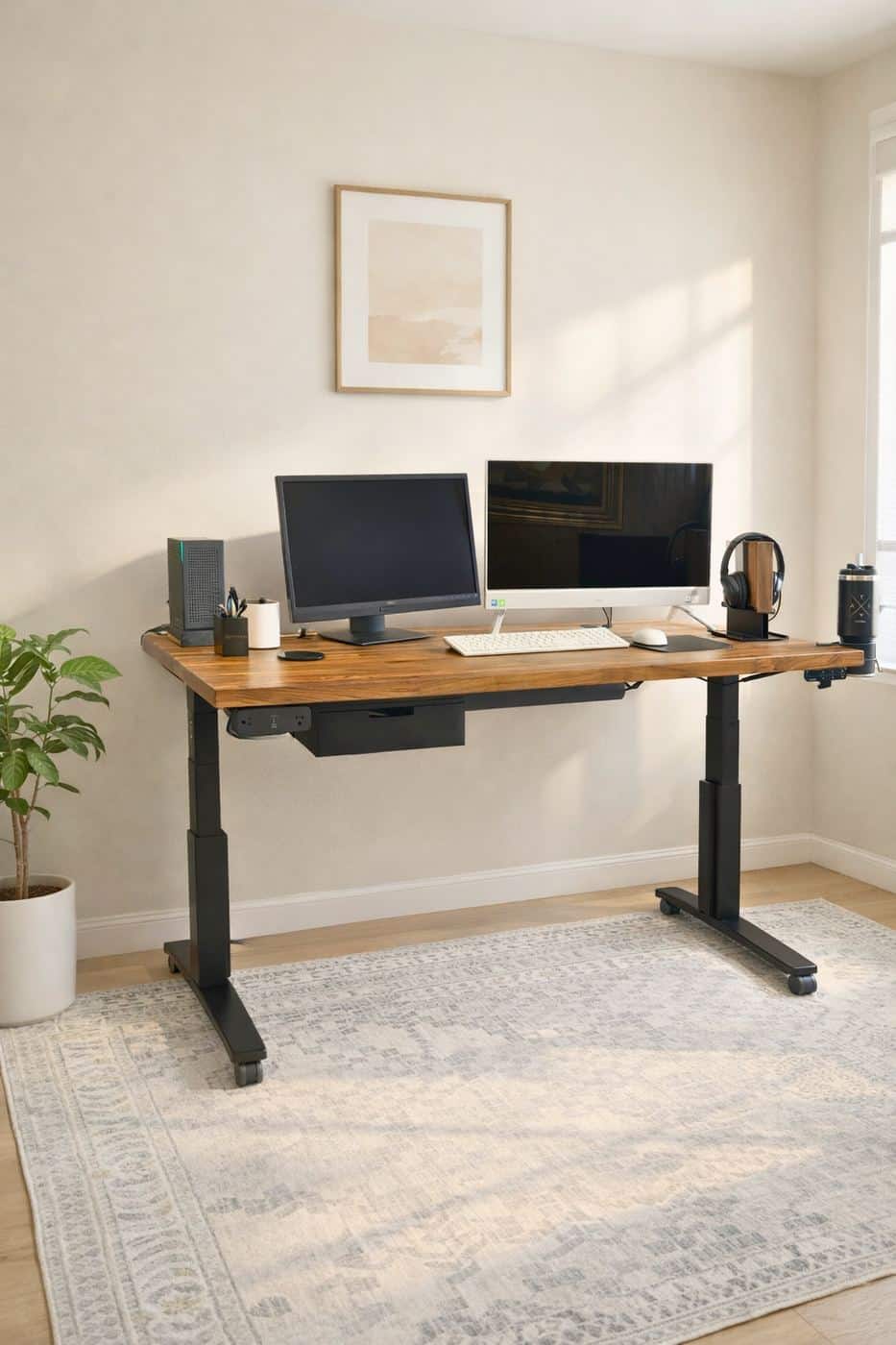
First impressions & unboxing
The moment the UPLIFT V3 showed up at my door, I could tell this wasn't going to be one of those flat-pack, budget desk experiences. The box was enormous and noticeably heavy — the kind of weight that tells you steel is involved, not particleboard held together by wishful thinking.
Everything was individually wrapped and well-protected. UPLIFT Desk packs their desks with serious care — foam inserts, wrapped legs, bagged hardware — and not a single part arrived with so much as a scratch. The instruction booklet is clear and uses visual diagrams rather than walls of text, which I genuinely appreciated.
Assembly took me about 45 to 60 minutes working alone, which is about average for a desk of this quality. A second set of hands would have made flipping the desktop easier, but it's definitely a solo job if you take your time. The hardware is high-quality — no stripped screws, no misaligned bolt holes, everything lined up exactly as it should.
Construction & build quality
This is where the UPLIFT V3 genuinely earns its price tag. The frame is constructed from commercial-grade steel — not the thin-gauge material you find in budget desks, but proper, heavy, cold-rolled steel that feels like it belongs in a professional office environment.
The three-stage telescoping legs extend and retract with a wider height range and distribute the load more evenly as they move. After weeks of daily adjustments, they don't show any play or looseness at the joints.
The welds on the frame are clean and uniform. My unit is the black frame, which has a matte, understated finish that looks sharp in any office environment. After several weeks of real use, my frame still looks exactly as it did when I assembled it — no chips, no scratches, no discoloration.
The UPLIFT V3 frame feels like something you'd find bolted to the floor of a commercial office — not a consumer product that lives and dies by Amazon reviews. The construction quality is genuinely impressive.
Frame & hardware details
The crossbar that connects the two legs under the desktop significantly improves lateral stability without getting in the way of your knees or chair positioning. The foot levelers on the base are easy to adjust and hold their position well on hardwood and carpet alike.
Cable management is thoughtfully handled with included clips and routing channels built into the frame. It keeps cords organized enough that the transition from sitting to standing doesn't turn into a mess of dangling cables.
Stability testing — does it wobble?
Stability is the single most important factor in a standing desk, and it's the thing most budget options fail at embarrassingly. A wobbly desk isn't just annoying — it means your monitors shake when you type and your coffee ripples every time you rest your hands.
The UPLIFT V3 is not that desk. I loaded this desk with a dual-monitor setup, a laptop stand, a docking station, a desk lamp, and various accessories — well over 60 pounds of equipment. At sitting height, it's essentially immovable. At maximum height, there is a very slight amount of forward-back flex when I push hard — but the UPLIFT V3's flex is noticeably smaller than competitors I've tested at similar price points.
During normal typing, even vigorous fast typing with heavy keystrokes, the monitors didn't shake. My coffee didn't ripple. The desk simply felt like a desk.
Motor performance & height adjustment
The UPLIFT V3 uses a dual-motor system — one motor per leg — which means both legs move in sync under equal power. After hundreds of adjustments over several weeks, I've noticed zero lean or tilt.
Speed is smooth and consistent. The desk travels at roughly 1.5 to 2 inches per second, which means a full transition from sitting to standing height takes about 12 to 15 seconds. The movement is whisper-quiet — a soft hum that stops the moment the desk reaches its target height.
Control panel & memory presets
The UPLIFT V3 handset is clean and intuitive. It includes a digital height display, four programmable memory presets, and up/down buttons. Setting your presets takes about 30 seconds — just press 1 to sit, press 2 to stand.
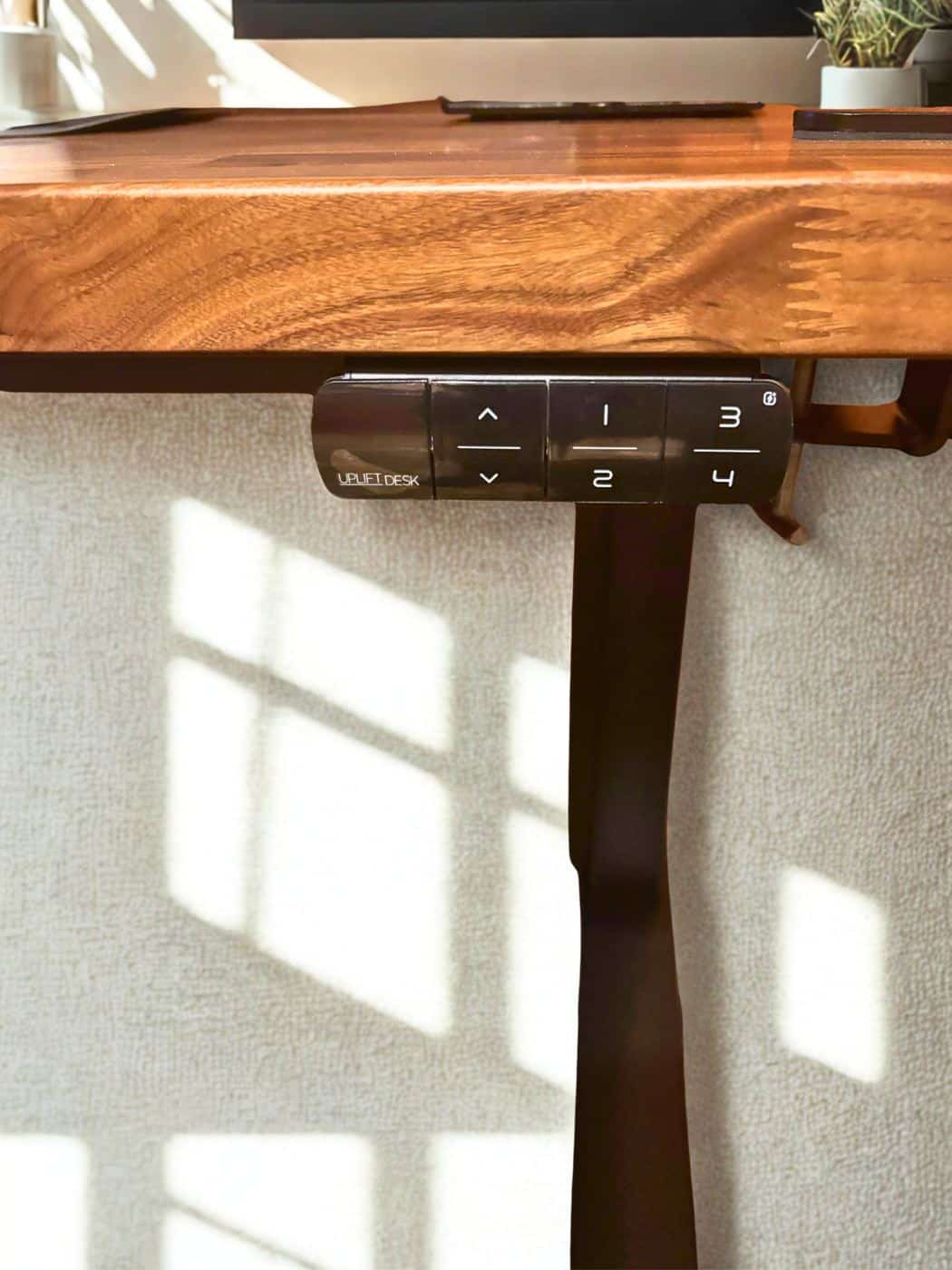
The anti-collision feature is worth mentioning. If the desk encounters an obstacle while moving, it stops and reverses automatically. I tested this intentionally, and it worked perfectly every time.
Height range
The V3 adjusts from approximately 24 inches at its lowest to just under 50 inches at its tallest, accommodating users from around 5'0″ to 6'5″ comfortably in both sitting and standing positions.
Desktop surface & design
UPLIFT Desk gives you a staggering number of desktop options — sizes, materials, edge profiles, and finishes. The unit I received features a laminate desktop, which I'll be honest was not what I expected to prefer. But after weeks of daily use, I've come to genuinely appreciate it — dense, heavy, and rigid with no flex across its surface.
The edges are finished with a rounded profile that's comfortable against your forearms. No sharp edges, no exposed MDF, no peeling laminate at the corners.
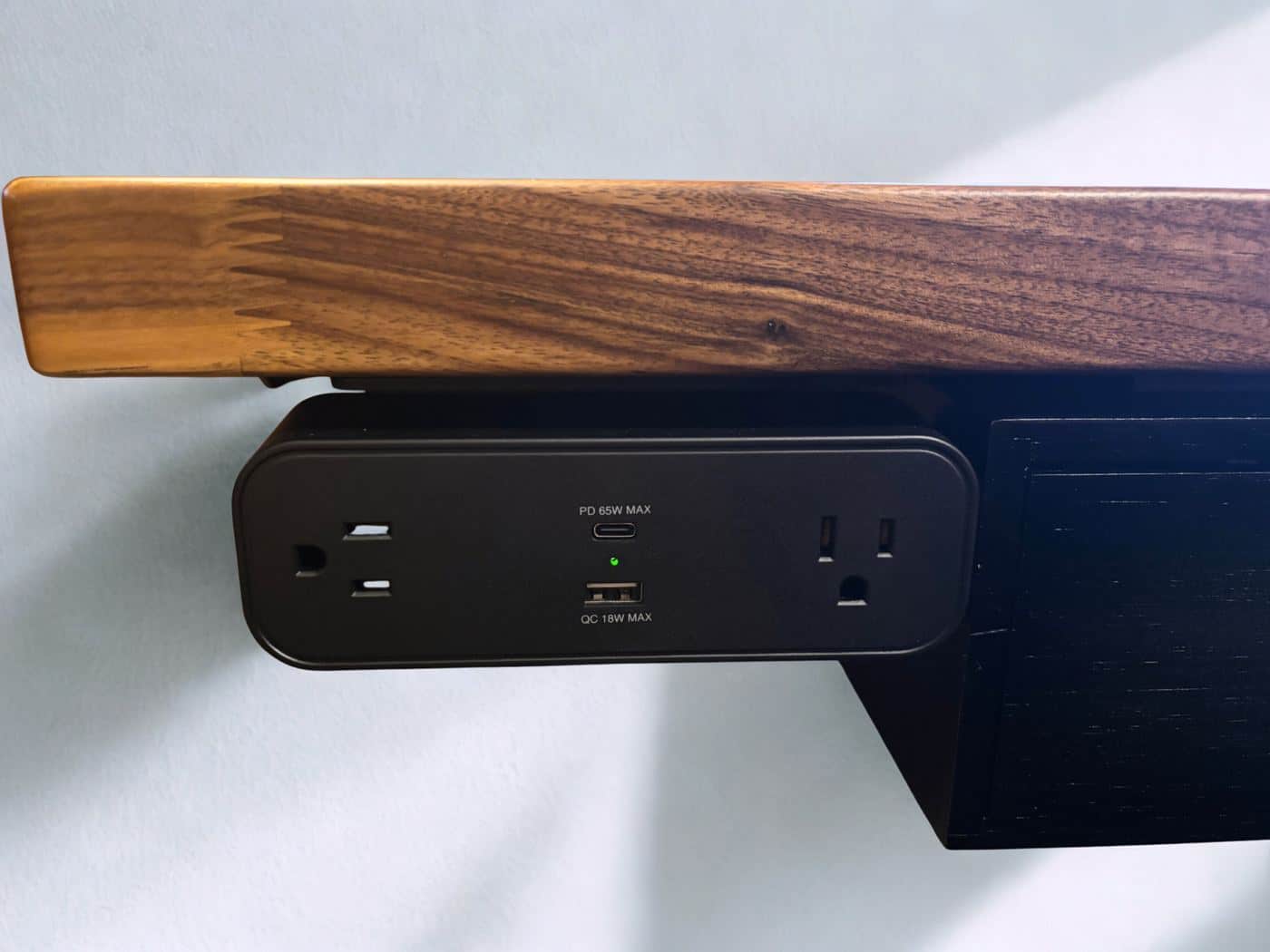
If you want something more premium, UPLIFT Desk offers real bamboo, solid hardwood, and a variety of other surface options at additional cost.
Aesthetic & office integration
The overall look of the UPLIFT V3 is clean and professional without being flashy. None of them scream "standing desk" the way some competitors do. They just look like very well-made desks.
Ergonomics & the paired chair experience
UPLIFT Desk also provided a chair for this review, and testing both together as an ergonomic system gave me a perspective that's hard to get when testing either product in isolation.
Switching to standing mode changed the dynamic entirely. The desk rose smoothly while I stayed standing in place, and within 15 seconds I was at my standing preset — elbows at 90 degrees, monitors at eye level, back straight. The back stiffness I typically get from extended sitting sessions? Substantially reduced.
After a full week of alternating between sitting and standing every 45 to 60 minutes, I noticed a real difference in my energy level and lower back comfort by 4pm. That's not a placebo — that's the desk doing its job.
If you spend more than 5 hours a day at a desk, the combination of a quality height-adjustable desk and an ergonomic office chair is not a luxury purchase. It's a health investment. Pair both with a thoughtful home office setup for the full ergonomic stack.
What I loved
- Exceptional frame and build quality
- Rock-solid stability across all heights
- Whisper-quiet dual-motor system
- Intuitive handset with memory presets
- Anti-collision safety feature works perfectly
- Clean, professional aesthetic
- Outstanding ergonomic performance with paired chair
- 15-year warranty covers all components
A few caveats
- Premium price — this is a serious investment
- Solo assembly is doable but easier with two people
- Extensive desktop options can feel overwhelming to choose from
- Slight flex at maximum height under heavy lateral pressure (normal for category)
Full specs at a glance
| Specification | UPLIFT V3 details |
|---|---|
| Height range | 22.6″ – 48.7″ (BIFMA certified, working surface) |
| Lifting capacity | 355 lbs |
| Motor system | Dual-motor |
| Travel speed | 2″ per second |
| Noise level | <48 dB |
| Frame material | Formed and welded steel, powder-coated |
| Frame width | Adjustable 41.3″ – 72.2″ (fits 42″–80″ desktops) |
| Desktop options | Laminate, bamboo, eco curve, butcher block, wide plank, live edge |
| Frame colors | Black, white, gray, industrial |
| Anti-collision | Yes — stops & reverses on obstacle |
| BIFMA certified | Yes — ANSI/BIFMA X5.5-2021 |
| Warranty | 15-year warranty covers all components |
| Starting price | $599 |
Final verdict — should you buy the UPLIFT V3?
After weeks of daily real-world use, the UPLIFT V3 has genuinely changed how I work — less back stiffness, better focus in the afternoons, a workspace that actually adapts to me instead of the other way around.
Is it expensive? Yes. Is it worth it? Also yes — but only if you're the kind of person who is going to actually use the sit-stand functionality daily. The construction quality alone justifies a significant portion of the price. This is a desk you will use for a decade or more. Browse more picks in our office equipment guides.
Prices and availability are subject to change. Last verified February 2026.
Frequently asked questions
Is the UPLIFT V3 worth the price?
Yes, if you will use sit-stand transitions daily. The commercial-grade steel frame, dual-motor system, and 15-year warranty justify the premium over budget desks that wobble at standing height. If you rarely stand, a fixed desk may be better value.
How much weight can the UPLIFT V3 hold?
The UPLIFT V3 is rated for 355 lbs of lifting capacity. I tested it with a dual-monitor setup, laptop stand, docking station, and accessories totaling well over 60 lbs with no stability issues.
Is the UPLIFT V3 stable at standing height?
Yes. At practical working heights, typing did not shake my monitors. There is slight flex at maximum height under heavy lateral pressure — normal for the category — but far less than most competitors I have tested.
How long does UPLIFT V3 assembly take?
About 45 to 60 minutes working alone. A second person helps when flipping the desktop, but solo assembly is doable if you follow UPLIFT's instructions and attach the legs to the frame before mounting the top.
What warranty does UPLIFT V3 include?
UPLIFT Desk includes a 15-year warranty that covers all components — frame, motors, electronics, and desktop. That coverage reflects the build quality I observed after weeks of daily height adjustments.
How does UPLIFT V3 compare to other standing desks?
For a multi-desk comparison, see our best standing desks roundup. The V3 stands out for stability, dual-motor sync, and included safety features like anti-collision — areas where cheaper desks often fail.
Related articles

Thomas Camp Jr.
Thomas has spent 14+ years advising small business owners on the tools, equipment, and software that actually improve daily operations. His recommendations are based on what he has seen work in real offices — not just spec sheets.


